Linux Task
R2026bSpawn task function as separate Linux thread
Linux Task block
To add a block to a model, double-click the canvas and start typing the block name. Then, select the block from the list.
Libraries:
HDL Coder Support Package for Intel FPGA and SoC Devices
Description
Add-On Required: This feature requires the HDL Coder Support Package for Intel FPGA and SoC Devices add-on.
Use this block to create a task function that spawns as a separate Linux® thread. The task function runs the code of the downstream Function-Call Subsystem block.
Examples
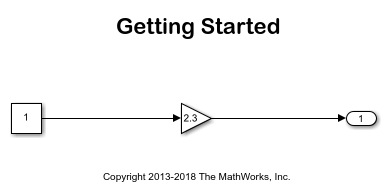
Get Started With Code Generation Using HDL Coder Support Package for Intel FPGA and SoC Devices
Use HDL Coder® Support Package for Intel® FPGA and SoC Devices to run a Simulink® model on an Intel SoC device.
Ports
Output
Parameters
To edit block parameters interactively, use the Property Inspector. From the Simulink® Toolstrip, on the Simulation tab, in the Prepare gallery, select Property Inspector.
To set the block parameter value programmatically, use
the set_param function.
To get the block parameter value
programmatically, use the get_param function.
Assign a name to this task. You can enter up to 32 letters and numbers. Do not use
standard C reserved characters, such as the / and
: characters.
Programmatic Use
Block Parameter:
taskName
|
Select the scheduling policy that applies to this thread. You can choose from these options:
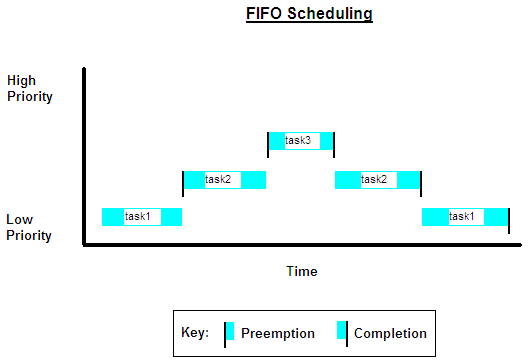
SCHED_FIFO— This option enables a first-in, first-out (FIFO) scheduling algorithm that executes real-time processes without time slicing. With FIFO scheduling, a higher-priority process preempts a lower-priority process. The lower-priority process remains at the top of the queue for its priority and resumes execution when no higher-priority process is ready to run.For example, in the FIFO scheduling image, task2 preempts task1. Then, task3 preempts task2. When task3 completes, task2 resumes. When task2 completes, task1 resumes.
Selecting
SCHED_FIFOdisplays the Thread priority parameter, which you can set to a value from 1 to 99.SCHED_OTHER— This option enables the default Linux time-sharing scheduling algorithm. You can use this scheduling for processes that do not require static-priority real-time scheduling. With this algorithm, the scheduler selects processes based on their dynamic priority within the static-priority 0 queue. If a process is ready to run but is nor selected, the operating system increases the dynamic priority of that process. Such prioritization helps the scheduler serve theSCHED_OTHERprocesses.Selecting
SCHED_OTHERhides the Thread priority parameter and sets the thread priority to 0.
Programmatic Use
Block Parameter:
taskPolicy
|
Specify the priority of the Linux thread. A value of 1 indicates a low priority, and a value of 99 indicates a high priority. Higher-priority tasks can preempt lower-priority tasks.
To enable this parameter, set Thread scheduling policy to
SCHED_FIFO.
Programmatic Use
Block Parameter:
taskPriority
|
Version History
Introduced in R2014b

