kagi
Kagi chart
Description
Examples
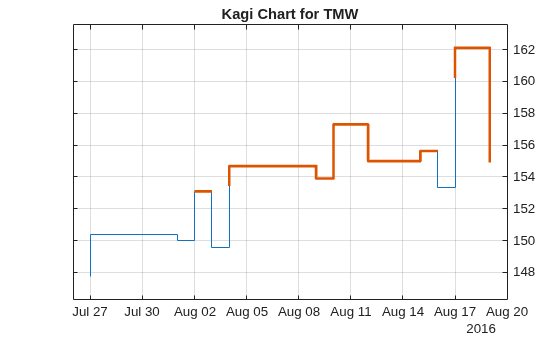
Load the file SimulatedStock.mat, which provides a timetable (TMW) for financial data for TMW stock. This Kagi chart is for closing prices of the stock TMW for the most recent 21 days. Note that the variable name of asset price is be renamed to 'Price' (case insensitive).
load SimulatedStock.mat TMW.Properties.VariableNames{'Close'} = 'Price'; kagi(TMW(end-20:end,:)) title('Kagi Chart for TMW')
Input Arguments
Data for a series of prices, specified as a matrix, table, or timetable.
Timetables and tables with M rows must contain a variable
named 'Price' (case insensitive).
Data Types: double | table | timetable
(Optional) Valid axis object, specified as an axes object. The kagi plot
is created in the axes specified by ax instead of in the
current axes (ax = gca). The option ax
can precede any of the input argument combinations.
Data Types: object
Output Arguments
Graphic handle of the figure, returned as a handle object.
More About
A Kagi chart represents price movements of an asset over time, focusing on the direction of price rather than the time intervals.
Kagi charts consist of a series of vertical lines that change direction based on price movements. The lines are drawn based on price changes and not on time intervals. The chart starts with a vertical line that represents the initial price level. If the price rises by a specified amount (called the "reversal amount"), a new line is drawn in the upward direction. Conversely, if the price falls by the same reversal amount, a line is drawn downward. The reversal amount is a key parameter in Kagi charts. It determines how much the price must change before a new line is drawn. This helps filter out minor price fluctuations and focuses on significant price movements.
Version History
Introduced in R2008aThe Data input accepts negative prices.
kagi accepts Data input as a matrix,
timetable, or table.
The syntax for kagi has changed. Previously, when using table
input, the first column of dates could be serial date numbers, date character
vectors, or datetime arrays, and you were required to have specific number of
columns.
When using table input, the new syntax for kagi supports:
No need for time information. If you want to pass in date information, use timetable input.
No requirement of specific number of columns. However, you must provide valid column names.
kagimust contain a column named‘price’(case insensitive).
MATLAB Command
You clicked a link that corresponds to this MATLAB command:
Run the command by entering it in the MATLAB Command Window. Web browsers do not support MATLAB commands.
Website auswählen
Wählen Sie eine Website aus, um übersetzte Inhalte (sofern verfügbar) sowie lokale Veranstaltungen und Angebote anzuzeigen. Auf der Grundlage Ihres Standorts empfehlen wir Ihnen die folgende Auswahl: .
Sie können auch eine Website aus der folgenden Liste auswählen:
So erhalten Sie die bestmögliche Leistung auf der Website
Wählen Sie für die bestmögliche Website-Leistung die Website für China (auf Chinesisch oder Englisch). Andere landesspezifische Websites von MathWorks sind für Besuche von Ihrem Standort aus nicht optimiert.
Amerika
- América Latina (Español)
- Canada (English)
- United States (English)
Europa
- Belgium (English)
- Denmark (English)
- Deutschland (Deutsch)
- España (Español)
- Finland (English)
- France (Français)
- Ireland (English)
- Italia (Italiano)
- Luxembourg (English)
- Netherlands (English)
- Norway (English)
- Österreich (Deutsch)
- Portugal (English)
- Sweden (English)
- Switzerland
- United Kingdom (English)