attentionLayer
R2026bDescription
A dot-product attention layer focuses on parts of the input using weighted multiplication operations.
Creation
Description
layer = attentionLayer(
specifies options using one or more name-value arguments. For example,
numHeads,Name=Value)attentionLayer(3,DropoutProbability=0.1) creates an attention layer
with 3 heads and specifies a dropout probability of 0.1.
Input Arguments
Number of attention heads, specified as a positive integer.
Each head performs a separate linear transformation of the input and computes attention weights independently. The layer uses these attention weights to compute a weighted sum of the input representations, generating a context vector. Increasing the number of heads lets the model capture different types of dependencies and attend to different parts of the input simultaneously. Reducing the number of heads can lower the computational cost of the layer.
This argument sets the NumHeads
property.
Data Types: single | double | int8 | int16 | int32 | int64 | uint8 | uint16 | uint32 | uint64
Name-Value Arguments
Specify optional pairs of arguments as
Name1=Value1,...,NameN=ValueN, where Name is
the argument name and Value is the corresponding value.
Name-value arguments must appear after other arguments, but the order of the
pairs does not matter.
Example: attentionLayer(3,DropoutProbability=0.1) creates an
attention layer with 3 heads and specifies a dropout probability of 0.1.
Since R2026a
Number of query groups (equivalent to the number of key-value heads), specified as one of these values:
"num-heads"— Use thenumHeadsargument value.Positive integer — Use the specified number of query groups. This value must divide the
numHeadsargument value.
The value of NumQueryGroups specifies the type of attention operation:
For multihead attention, set
NumQueryGroupsto the number of heads.For multiquery attention (MQA), set
NumQueryGroupsto1.For grouped-query attention (GQA), set
NumQueryGroupsto a positive integer between1and the number of heads.
Using multiquery attention and grouped-query attention in conjunction with the
KeyState and ValueState properties can
reduce memory and computation time for large inputs.
This argument sets the NumQueryGroups property.
Data Types: single | double | int8 | int16 | int32 | int64 | uint8 | uint16 | uint32 | uint64 | char | string
Multiplicative factor for scaling dot product of queries and keys, specified as one of these values:
"auto"— Multiply the dot product by1/sqrt(D), whereDis the number of channels of the keys divided byNumHeads.Numeric scalar — Multiply the dot product by the specified scalar.
This argument sets the Scale
property.
Data Types: single | double | int8 | int16 | int32 | int64 | uint8 | uint16 | uint32 | uint64 | char | string | cell
Flag indicating whether the layer has an input that represents the padding mask,
specified as 0 (false) or 1
(true).
If the HasPaddingMaskInput value is 0
(false), then the layer has three inputs with the names
'query', 'key', and 'value',
which correspond to the input queries, keys, and values, respectively. In this case, the
layer treats all elements as data.
If the HasPaddingMaskInput value is 1
(true), then the layer has an additional input with the name
'mask', which corresponds to the padding mask. In this case, the
padding mask is an array of ones and zeros. The layer uses or ignores elements of the
queries, keys, and values when the corresponding element in the mask is one or zero,
respectively.
The dimension labels of the padding mask must match the dimension labels of the keys, ignoring any "C" (channel) and "U" (unspecified) dimensions. (since R2026a).
Before R2026a: The format of the padding mask must match that of the input keys.
The size of the "S" (spatial) or "T" (time) dimension of the padding mask must match the sum of the corresponding dimension in the keys and values and the size of the second dimension of the KeyState and ValueState properties. The size of the "B" (batch) dimension of the padding mask must match the size of the corresponding dimensions in the keys and values.
The padding mask can have any number of channels. The software uses only the values in the first channel to indicate padding values.
This argument sets the HasPaddingMaskInput property.
Flag indicating whether the layer has an output that represents the scores (also
known as the attention weights), specified as 0
(false) or 1
(true).
If the HasScoresOutput value is 0
(false), then the layer has one output with the name
'out', which corresponds to the output data.
If the HasScoresOutput value is 1
(true), then the layer has two inputs with the names
'out' and 'scores', which correspond to the output
data and the attention scores, respectively.
This argument sets the HasScoresOutput property.
Attention mask indicating which elements to include when applying the attention operation, specified as one of these values:
"none"— Do not prevent attention to elements with respect to their positions. In this case, the software prevents attention using only the padding mask."causal"— Prevent elements in position m in the"S"(spatial) or"T"(time) dimension of the input queries from providing attention to the elements in positions n, where n is greater than m in the corresponding dimension of the input keys and values. Use this option for autoregressive models.Logical or numeric array — Prevent attention to elements of the input keys and values when the corresponding element in the specified array is
0. The specified array must be an Nk-by-Nq matrix or a Nk-by-Nq-by-numObservationsarray, where Nk is the size of the"S"(spatial) or"T"(time) dimension of the input keys, Nq is the size of the corresponding dimension of the input queries, andnumObservationsis the size of the"B"dimension in the input queries.
This argument sets the AttentionMask property.
Data Types: single | double | int8 | int16 | int32 | int64 | uint8 | uint16 | uint32 | uint64 | logical | char | string
Probability of dropping out attention scores, specified as a scalar in the range [0, 1).
During training, the software randomly sets values in the attention scores to zero using the specified probability. These dropouts can encourage the model to learn more robust and generalizable representations by preventing it from relying too heavily on specific dependencies.
This argument sets the DropoutProbability property.
Data Types: single | double | int8 | int16 | int32 | int64 | uint8 | uint16 | uint32 | uint64
Since R2026a
Key state, specified as a c-by-x-by-b numeric array or [], where c is the size of the "C" (channel) dimension of the key input, b is the size of the "B" (batch) dimension of the input, and x can be any value.
This argument sets the KeyState
property.
When you update the state of a network containing a AttentionLayer object with the AttentionMask property set to 'causal', the KeyState property contains keys used in previous forward passes of the network. If AttentionMask is 'none', then the KeyState property must be empty.
After you set this value manually, calls to the resetState function set the key state to this value.
Data Types: single | double
Since R2026a
Value state, specified as a c-by-x-by-b numeric array or [], where c is the size of the "C" (channel) dimension of the value input, b is the size of the "B" (batch) dimension of the input, and x can be any value.
This argument sets the ValueState property.
When you update the state of a network containing a AttentionLayer object with the AttentionMask property set to "causal", the ValueState property contains values used in previous forward passes of the network. If AttentionMask is "none", then the ValueState property must be empty.
After you set this value manually, calls to the resetState function set the value state to this value.
Data Types: single | double
Properties
Attention
This property is read-only after object creation. To set this property, use the corresponding
positional input argument when you create the AttentionLayer
object.
Number of attention heads, represented as a positive integer.
Each head performs a separate linear transformation of the input and computes attention weights independently. The layer uses these attention weights to compute a weighted sum of the input representations, generating a context vector. Increasing the number of heads lets the model capture different types of dependencies and attend to different parts of the input simultaneously. Reducing the number of heads can lower the computational cost of the layer.
Data Types: double
Since R2026a
This property is read-only after object creation. To set this property, use the corresponding
name-value argument when you create the AttentionLayer object.
Number of query groups (equivalent to the number of key-value heads), represented as one of these values:
'num-heads'— Use theNumHeadsproperty value.Positive integer — Use the specified number of query groups. This value must divide the
NumHeadsproperty value.
The value of NumQueryGroups specifies the type of attention operation:
If
NumQueryGroupsis the number of heads, then the layer performs multihead attention.If
NumQueryGroupsis1, then the layer performs multiquery attention (MQA).If
NumQueryGroupsis a positive integer between1and the number of heads, then the layer performs grouped-query attention (GQA).
Using multiquery attention and grouped-query attention in conjunction with the
KeyState and ValueState properties can
reduce memory and computation time for large inputs.
Data Types: double
This property is read-only after object creation. To set this property, use the corresponding
name-value argument when you create the AttentionLayer object.
Multiplicative factor for scaling dot product of queries and keys, represented as one of these values:
'auto'— Multiply the dot product by1/sqrt(D), whereDis the number of channels of the keys divided byNumHeads.Numeric scalar — Multiply the dot product by the specified scalar.
Data Types: double | char
This property is read-only after object creation. To set this property, use the corresponding
name-value argument when you create the AttentionLayer object.
Flag indicating whether the layer has an input that represents the padding mask,
represented as 0 (false) or 1
(true).
If the HasPaddingMaskInput value is 0
(false), then the layer has three inputs with the names
'query', 'key', and 'value',
which correspond to the input queries, keys, and values, respectively. In this case, the
layer treats all elements as data.
If the HasPaddingMaskInput value is 1
(true), then the layer has an additional input with the name
'mask', which corresponds to the padding mask. In this case, the
padding mask is an array of ones and zeros. The layer uses or ignores elements of the
queries, keys, and values when the corresponding element in the mask is one or zero,
respectively.
The dimension labels of the padding mask must match the dimension labels of the keys, ignoring any "C" (channel) and "U" (unspecified) dimensions. (since R2026a).
Before R2026a: The format of the padding mask must match that of the input keys.
The size of the "S" (spatial) or "T" (time) dimension of the padding mask must match the sum of the corresponding dimension in the keys and values and the size of the second dimension of the KeyState and ValueState properties. The size of the "B" (batch) dimension of the padding mask must match the size of the corresponding dimensions in the keys and values.
The padding mask can have any number of channels. The software uses only the values in the first channel to indicate padding values.
This property is read-only after object creation. To set this property, use the corresponding
name-value argument when you create the AttentionLayer object.
Flag indicating whether the layer has an output that represents the scores (also known
as the attention weights), represented as 0
(false) or 1 (true).
If the HasScoresOutput value is 0
(false), then the layer has one output with the name
'out', which corresponds to the output data.
If the HasScoresOutput value is 1
(true), then the layer has two inputs with the names
'out' and 'scores', which correspond to the output
data and the attention scores, respectively.
Attention mask indicating which elements to include when applying the attention operation, specified as one of these values:
'none'— Do not prevent attention to elements with respect to their positions. In this case, the software prevents attention using only the padding mask.'causal'— Prevent elements in position m in the"S"(spatial) or"T"(time) dimension of the input queries from providing attention to the elements in positions n, where n is greater than m in the corresponding dimension of the input keys and values. Use this option for autoregressive models.Logical or numeric array — Prevent attention to elements of the input keys and values when the corresponding element in the specified array is
0. The specified array must be an Nk-by-Nq matrix or a Nk-by-Nq-by-numObservationsarray, Nk is the size of the"S"(spatial) or"T"(time) dimension of the input keys, Nq is the size of the corresponding dimension of the input queries, andnumObservationsis the size of the"B"(batch) dimension in the input queries.
Data Types: double | char
Probability of dropping out attention scores, specified as a scalar in the range [0, 1).
During training, the software randomly sets values in the attention scores to zero using the specified probability. These dropouts can encourage the model to learn more robust and generalizable representations by preventing it from relying too heavily on specific dependencies.
Data Types: double
State
Since R2026a
Key state, specified as a c-by-x-by-b numeric array or [], where c is the size of the "C" (channel) dimension of the key input, b is the size of the "B" (batch) dimension of the input, and x can be any value.
When you update the state of a network containing a AttentionLayer object with the AttentionMask property set to 'causal', the KeyState property contains keys used in previous forward passes of the network. If AttentionMask is 'none', then the KeyState property must be empty.
After you set this value manually, calls to the resetState function set the key state to this value.
Data Types: single | double
Since R2026a
Value state, specified as a c-by-x-by-b numeric array or [], where c is the size of the "C" (channel) dimension of the value input, b is the size of the "B" (batch) dimension of the input, and x can be any value.
When you update the state of a network containing a AttentionLayer object with the AttentionMask property set to "causal", the ValueState property contains values used in previous forward passes of the network. If AttentionMask is "none", then the ValueState property must be empty.
After you set this value manually, calls to the resetState function set the value state to this value.
Data Types: single | double
Layer
This property is read-only.
Number of inputs to the layer, represented as 3 or
4.
If the HasPaddingMaskInput value is 0
(false), then the layer has three inputs with the names
'query', 'key', and 'value',
which correspond to the input queries, keys, and values, respectively. In this case, the
layer treats all elements as data.
If the HasPaddingMaskInput value is 1
(true), then the layer has an additional input with the name
'mask', which corresponds to the padding mask. In this case, the
padding mask is an array of ones and zeros. The layer uses or ignores elements of the
queries, keys, and values when the corresponding element in the mask is one or zero,
respectively.
Data Types: double
This property is read-only.
Input names of the layer, represented as a cell array of character vectors.
If the HasPaddingMaskInput value is 0
(false), then the layer has three inputs with the names
'query', 'key', and 'value',
which correspond to the input queries, keys, and values, respectively. In this case, the
layer treats all elements as data.
If the HasPaddingMaskInput value is 1
(true), then the layer has an additional input with the name
'mask', which corresponds to the padding mask. In this case, the
padding mask is an array of ones and zeros. The layer uses or ignores elements of the
queries, keys, and values when the corresponding element in the mask is one or zero,
respectively.
This property is read-only.
Number of outputs of the layer.
If the HasScoresOutput value is 0
(false), then the layer has one output with the name
'out', which corresponds to the output data.
If the HasScoresOutput value is 1
(true), then the layer has two inputs with the names
'out' and 'scores', which correspond to the output
data and the attention scores, respectively.
Data Types: double
This property is read-only.
Output names of the layer.
If the HasScoresOutput value is 0
(false), then the layer has one output with the name
'out', which corresponds to the output data.
If the HasScoresOutput value is 1
(true), then the layer has two inputs with the names
'out' and 'scores', which correspond to the output
data and the attention scores, respectively.
Examples
Create a dot-product attention layer with 10 heads.
layer = attentionLayer(10)
layer =
  AttentionLayer with properties:

                   Name: ''
              NumInputs: 3
             InputNames: {'query'  'key'  'value'}
               NumHeads: 10
         NumQueryGroups: 10
                  Scale: 'auto'
          AttentionMask: 'none'
     DropoutProbability: 0
    HasPaddingMaskInput: 0
        HasScoresOutput: 0

   Learnable Parameters
    No properties.

   State Parameters
               KeyState: []
             ValueState: []

  Show all properties
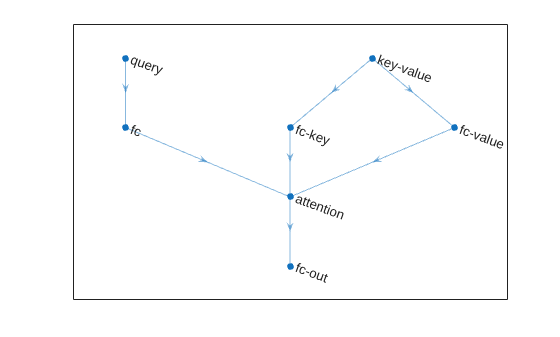
Create a simple neural network with cross-attention.
numChannels = 256;
numHeads = 8;

net = dlnetwork;

layers = [
    sequenceInputLayer(1,Name="query")
    fullyConnectedLayer(numChannels)
    attentionLayer(numHeads,Name="attention")
    fullyConnectedLayer(numChannels,Name="fc-out")];

net = addLayers(net,layers);

layers = [
    sequenceInputLayer(1, Name="key-value")
    fullyConnectedLayer(numChannels,Name="fc-key")];

net = addLayers(net,layers);
net = connectLayers(net,"fc-key","attention/key");

net = addLayers(net, fullyConnectedLayer(numChannels,Name="fc-value"));
net = connectLayers(net,"key-value","fc-value");
net = connectLayers(net,"fc-value","attention/value");
View the network in a plot.
figure
plot(net)
Algorithms
The attention operation focuses on parts of the input using weighted multiplication operations.
The single-head dot-product attention operation is given by
where:
Q denotes the queries.
K denotes the keys.
V denotes the values.
denotes the scaling factor.
M is a mask array of ones and zeros.
p is the dropout probability.
The mask operation includes or excludes the values of the matrix multiplication by setting values of the input to for zero-valued mask elements. The mask is the union of the padding and attention masks. The softmax function normalizes the value of the input data across the channel dimension such that it sums to one. The dropout operation sets elements to zero with probability p.
The multihead attention operation applies the attention operation across multiple heads. Each head uses its own learnable query, key, and value projection matrices.
The multihead attention operation for the queries Q, keys K, and values V is given by
where
h is the number of heads.
WO is a learnable projection matrix for the output.
For the multihead attention operation, each learnable projection matrix for the queries, keys, and values are composed of concatenated matrices Wi, where i indexes over the heads.
The head operation is given by
where:
i indexes over the heads.
WQ is a learnable projection matrix for the queries.
WK is a learnable projection matrix for the keys.
WV is a learnable projection matrix for the values.
The multiquery attention (MQA) operation applies the attention operation across multiple heads. Each head uses its own learnable query projection matrix. The operation uses the same learnable key and value projection matrices across all heads.
The multiquery attention operation for the queries Q, keys K, and values V is given by
where
h is the number of heads.
WO is a learnable projection matrix for the output.
For the multiquery attention operation, only the learnable projection matrix for the queries is composed of concatenated matrices Wi, where i indexes over the heads.
For multiquery attention, the head operation is given by
where:
i indexes over the heads.
WQ is a learnable projection matrix for the queries.
WK is a learnable projection matrix for the keys.
WV is a learnable projection matrix for the values.
The grouped query attention (GQA) operation applies the attention operation across several heads. The operation partitions the heads into groups that use the same learnable query projection matrix. The operation uses the same learnable key and value projection matrices for each group of query heads.
The grouped-query attention operation for the queries Q, keys K, and values V is given by
where
h is the number of heads.
WO is a learnable projection matrix for the output.
For the grouped query attention operation:
The learnable projection matrix for the queries is composed of concatenated matrices Wi, where i indexes over the heads.
The learnable projection matrices for the keys and values are composed of concatenated matrices Wj, where j indexes over the groups.
When the number of query groups is greater than 1, the operation creates groups of query channels-per-head, and applies the attention operation within each group.
For example, for six heads with three query groups, the operation splits the query channels into the heads (h1, …, h6) and then creates the groups of heads g1=(h1,h2), g2=(h3,h4), and g3=(h5,h6). The operation also splits the key and value channels into the heads g1, g2, and g3.
When the number of query groups matches the number of heads, the groups have one head each and is equivalent to multihead attention. When the number of query groups is 1, then all the heads are in the same group and is equivalent to multiquery attention.
The head operation is given by
where:
i indexes over the heads.
g(i) is the group number of head i.
WQ is a learnable projection matrix for the queries.
WK is a learnable projection matrix for the keys.
WV is a learnable projection matrix for the values.
Most layers in a layer array or layer graph pass data to subsequent layers as formatted
dlarray objects.
The format of a dlarray object is a string of characters in which each
character describes the corresponding dimension of the data. The format consists of one or
more of these characters:
"S"— Spatial"C"— Channel"B"— Batch"T"— Time"U"— Unspecified
For example, you can describe 2-D image data that is represented as a 4-D array, where the
first two dimensions correspond to the spatial dimensions of the images, the third
dimension corresponds to the channels of the images, and the fourth dimension
corresponds to the batch dimension, as having the format "SSCB"
(spatial, spatial, channel, batch).
You can interact with these dlarray objects in automatic differentiation
workflows, such as those for:
developing a custom layer
using a
functionLayerobjectusing the
forwardandpredictfunctions withdlnetworkobjects
This table shows the supported input formats of AttentionLayer objects and the
corresponding output format. If the software passes the output of the layer to a custom
layer that does not inherit from the nnet.layer.Formattable class, or to
a FunctionLayer object with the Formattable property set
to 0 (false), then the layer receives an unformatted
dlarray object with dimensions ordered according to the formats in this
table. The formats listed here are only a subset of the formats that the layer supports. The
layer might support additional formats, such as formats with additional
"S" (spatial) or "U" (unspecified)
dimensions.
Query, Key, and Value Format | Output Format | Scores Output Format (When
|
|---|---|---|
"CB" (channel, batch) | "CB" (channel, batch) | "UUUU" (unspecified, unspecified, unspecified,
unspecified) |
"SCB" (spatial, channel, batch) | "SCB" (spatial, channel, batch) | "UUUU" (unspecified, unspecified, unspecified,
unspecified) |
"CBT" (channel, batch, time) | "CBT" (channel, batch, time) | "UUUU" (unspecified, unspecified, unspecified,
unspecified) |
"SC" (spatial, channel) | "SC" (spatial, channel) | "UUU" (unspecified, unspecified, unspecified) |
"CT" (channel, time) | "CT" (channel, time) | "UUU" (unspecified, unspecified, unspecified) |
"BT" (batch, time) | "CBT" (channel, batch, time) | "UUUU" (unspecified, unspecified, unspecified,
unspecified) |
"SB" (spatial, batch) | "SCB" (spatial, channel, batch) | "UUUU" (unspecified, unspecified, unspecified,
unspecified) |
If HasMaskInput is 1 (true),
then the mask must have the same format as the queries, keys, and values.
References
[1] Vaswani, Ashish, Noam Shazeer, Niki Parmar, Jakob Uszkoreit, Llion Jones, Aidan N. Gomez, Łukasz Kaiser, and Illia Polosukhin. "Attention is all you need." In Advances in Neural Information Processing Systems, Vol. 30. Curran Associates, Inc., 2017. https://papers.nips.cc/paper_files/paper/2017/hash/3f5ee243547dee91fbd053c1c4a845aa-Abstract.html.
Extended Capabilities
Usage notes and limitations:
Code generation is not supported when
HasScoresOutputis set totrue.Code generation does not support passing
dlarrayobjects with"U"(unspecified) dimensions to this layer.
Refer to the usage notes and limitations in the C/C++ Code Generation section. The same usage notes and limitations apply to GPU code generation.
Version History
Introduced in R2024aThe value of NumQueryGroups
specifies the type of attention operation:
For multihead attention, set
NumQueryGroupstonumHeads.For multiquery attention (MQA), set
NumQueryGroupsto1.For grouped-query attention (GQA), set
NumQueryGroupsto a positive integer between1andnumHeads.
Using multiquery attention and grouped-query attention in conjunction with the
KeyState and ValueState properties can reduce
memory and computation time for large inputs.
You can now cache previous keys and values using the new KeyState
and ValueState properties to accelerate making autoregressive
predictions with transformer networks. Caching previous keys and values allows you to pass
only one previous prediction as input, instead of an entire sequence. Previously,
forecasting a future value required using all previous time steps as input.
To cache the keys and values and use them to make autoregressive predictions, set the state of a transformer network after each prediction. For example, this code uses a transformer network to forecast future values of a sequence using one previous time step as input.
% Reset the network state.
net = resetState(net);

% Get the first time step in the sequence.
sequence = initialValue;

% Predict values for the next 100 time steps.
for idx = 1:100
    % Make predicitions by passing the previous value as input.
    previousStep = sequence(end);
    [sequence(end+1),state] = predict(net,previousStep);

    % Update the network state.
    net.State = state;
end
If the HasPaddingMaskInput property value is 1
(true), then the input data for the corresponding padding mask input
does not require a channel dimension. For masks that do not specify a channel dimension, the
operation assumes a singleton channel dimension.
MATLAB Command
You clicked a link that corresponds to this MATLAB command:
Run the command by entering it in the MATLAB Command Window. Web browsers do not support MATLAB commands.


Website auswählen
Wählen Sie eine Website aus, um übersetzte Inhalte (sofern verfügbar) sowie lokale Veranstaltungen und Angebote anzuzeigen. Auf der Grundlage Ihres Standorts empfehlen wir Ihnen die folgende Auswahl: .
Sie können auch eine Website aus der folgenden Liste auswählen:
So erhalten Sie die bestmögliche Leistung auf der Website
Wählen Sie für die bestmögliche Website-Leistung die Website für China (auf Chinesisch oder Englisch). Andere landesspezifische Websites von MathWorks sind für Besuche von Ihrem Standort aus nicht optimiert.
Amerika
- América Latina (Español)
- Canada (English)
- United States (English)
Europa
- Belgium (English)
- Denmark (English)
- Deutschland (Deutsch)
- España (Español)
- Finland (English)
- France (Français)
- Ireland (English)
- Italia (Italiano)
- Luxembourg (English)
- Netherlands (English)
- Norway (English)
- Österreich (Deutsch)
- Portugal (English)
- Sweden (English)
- Switzerland
- United Kingdom (English)