Using Extrinsic Functions
R2026bBy default, the code generator produces C or C++ code for each function you call in the MATLAB® code. You can bypass code generation for a given function by declaring that the function is extrinsic.
When you generate standalone code, the code generator attempts to determine whether the extrinsic function call affects the output of the calling function. If the extrinsic function call does not affect the output, the code generator omits the call in the generated code. For example, the code generator automatically omits calls to many MATLAB display functions. If an extrinsic function call affects the output of the calling function, standalone code generation fails.
When the code generator encounters an extrinsic function call during MEX generation or MATLAB Function (Simulink) block simulation, it produces a call to MATLAB instead of generating code.
This flow chart depicts how the code generator handles extrinsic functions.
When an extrinsic function returns an output during MEX execution or MATLAB
Function block simulation, the output is an mxArray, also known
as a MATLAB array. To use an mxArray, you often must first convert it to
a known type. For example, set y = 0 before assigning y =
myExtrinsicCall. See Working With mxArray Outputs in Generated Code.
Declaring Extrinsic Functions
If you generate MEX code or simulate a MATLAB Function block, consider declaring a MATLAB function as extrinsic when the MATLAB code:
Calls a function that is not supported for code generation.
Calls a function that displays or logs data. Because these functions are generally not used in the generated standalone code, you can call them during simulation or MEX execution without generating unnecessary code.
If you generate standalone code, consider declaring a MATLAB function as extrinsic when the MATLAB code:
Calls a function that is not supported for code generation and does not affect the output of the calling function.
Calls a function that displays or logs data.
Executes a function call that can be folded into a constant in the generated code. For example, the function might perform a calculation at code generation time that does not need to be repeated at run time. See Reduce Code Generation Time.
Declare Extrinsic Function
To explicitly instruct the code generator to treat a MATLAB function as extrinsic, use one of these approaches:
To treat all calls to a function as extrinsic in the current MATLAB function, use
coder.extrinsic. Thecoder.extrinsicdeclaration has function scope, meaning it affects all calls in the function that contains it.To treat a single function call as extrinsic, call the function by using
feval. The code generator does not treat other calls to that function as extrinsic.
You can call private functions extrinsically. How the code generator resolves an extrinsic call to a private function depends on whether the extrinsic function call occurs during code generation or at run time:
If you use
coder.constto force the code generator to evaluate an extrinsic function during code generation, the code generator looks for theprivatesubfolder in the folder that contains the calling function.At run time, even if the calling function is in another folder, MATLAB looks for the
privatesubfolder in the working folder.
Declare Extrinsic Method
To call a method of a MATLAB class extrinsically, you must use the function syntax. For example, to
call method myMethod of class MyClass extrinsically,
use one of these approaches:
Pass the name of the method to
coder.extrinsic, then call the method using function syntax.coder.extrinsic("myMethod"); obj = MyClass; x = myMethod(obj,in);Use
fevalto call the method using function syntax.obj = MyClass; x = feval("myMethod",obj,in);
Identifying Extrinsic Functions
The generated code can include extrinsic functions that you do not declare explicitly.
The code generator treats many common MATLAB visualization functions, such as disp, plot, and figure, as extrinsic by default. In addition, if you pass the
mxArray output of an extrinsic function to another function, the code
generator treats the function that accepts the mxArray as
extrinsic.
To identify extrinsic functions in your MATLAB code, use one of these approaches:
If you generate code by using MATLAB Coder™, inspect the code generation report. See Code Generation Reports.
If you simulate a MATLAB Function block in Simulink®, inspect the MATLAB function report. See MATLAB Function Reports (Simulink).
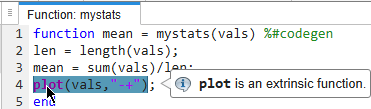
The report highlights extrinsic functions in purple. If you point to an extrinsic
function, the report displays a tooltip. For example, this image shows the code generation
report for a MATLAB function that calls plot, which the code generator
automatically treats as extrinsic.
Disabling Extrinsic Calls in MEX Functions
Extrinsic function calls can negatively affect MEX function performance, because the code generator copies the data that you pass to the extrinsic function and sends the copy to MATLAB for execution. Then, MATLAB copies the output data back into the MEX function environment.
You can force the code generator to omit calls to extrinsic functions during MEX generation by using one of these approaches:
In the Code Generation Settings dialog box, clear the Keep extrinsic calls check box.
In a MEX code configuration object, set the
ExtrinsicCallsproperty tofalse.
When you disable extrinsic calls, the code generator omits
all extrinsic calls in the MEX function, including calls
to automatic extrinsic functions, calls to functions you explicitly declare using
coder.extrinsic, and calls that use feval. If
you disable extrinsic function calls and an extrinsic function call
affects the output of the calling function, MEX
generation fails. You cannot disable extrinsic function calls during MATLAB
Function block simulation.
Limitations
These limitations apply when you call a MATLAB function extrinsically:
You cannot use
coder.cevalto call an extrinsic function.You cannot call local or nested functions extrinsically.
You cannot call MATLAB functions that inspect the caller or that read or write to the caller workspace extrinsically, including:
MATLAB Function block simulation or MEX function execution can produce unpredictable results if an extrinsic function:
Changes the working folder
Changes the MATLAB path
Deletes or adds MATLAB files
Changes warning states
Changes MATLAB preferences
Changes Simulink parameters
You cannot pass values into or out of an extrinsic function that are or contain:
Handle classes
Function handles
Variables declared by using
coder.opaque
You can call extrinsic functions with up to 64 inputs and 64 outputs.
When you simulate a MATLAB Function block in rapid accelerator mode, the code generator omits extrinsic calls. If an extrinsic call affects block outputs, the rapid accelerator simulation fails.
See Also
coder.const | coder.extrinsic | feval

