FiniteGapFeed
R2026bDescription
Use the FiniteGapFeed object to specify the
FeedDefinitions property in a parent pcbStack
object.
The FiniteGapFeed object represents a coplanar multi-ground edge feed
across a physically finite gap between conductors. This feed excites the finite gap directly,
modeling the structure more realistically. A delta-gap feed, by contrast, would require you to
make the gap infinitesimally small by adding more metal, which can introduce undesirable
parasitic effects.
Creation
Description
f1 = FiniteGapFeed creates a default
FiniteGapFeed object.
f1 = FiniteGapFeed(
sets object properties using one or more name-value arguments.
PropertyName=Value)PropertyName is the property name, and Value is
the corresponding value. You can specify several name-value arguments in any order as
PropertyName1=Value1,...,PropertyNameN=ValueN. Properties that you
do not specify retain their default values.
Properties
Examples
The radiator is two collinear arms separated by a feed gap, etched on a dielectric substrate.
Define the length and width of each arm, the feed gap between them, and the board and substrate dimensions.
La = 0.030;
Wa = 0.004;
g  = 0.002;
Lb = 0.090;
Wb = 0.030;
sub = 1.6e-3;
Define an FR4 substrate and set its thickness.
d = dielectric("FR4");
d.Thickness = sub;
Create the two arms as rectangles using the antenna.Rectangle object, positioned symmetrically about the origin and separated by the feed gap. Combine them using Boolean addition. One arm acts as the signal conductor and the other as the ground conductor of the differential feed.
xL = -(g/2 + La/2);
xR =  (g/2 + La/2);
armSignal = antenna.Rectangle(Length=La, Width=Wa, Center=[xL 0]);
armGround = antenna.Rectangle(Length=La, Width=Wa, Center=[xR 0]);
top = armSignal + armGround;
Create the pcbStack as a two-layer stack: the radiator over the substrate with no ground plane, so the structure remains balanced.
p = pcbStack;
p.BoardShape = antenna.Rectangle(Length=Lb, Width=Wb);
p.BoardThickness = sub;
p.Layers = {top, d};
To enable the FeedDefinitions property, set the FeedFormat property to FeedDefinitions.
p.FeedFormat = 'FeedDefinitions';Create the FiniteGapFeed object and orient across the gap between the arms. Use the SignalLocations property to set the signal side of the gap and the GroundLocations property to set the ground side, so the feed spans the physical gap. The SignalWidths property gives the feed its finite physical width, matching the arm width.
f = FiniteGapFeed(SignalLocations=[-g/2 0], GroundLocations=[g/2 0], ...
    SignalWidths=Wa, SignalLayers=1);
p.FeedDefinitions = f;
View the structure to confirm the two arms, the feed gap, and the substrate.
figure
show(p)
title("Differentially Excited PCB Radiator with Finite-Gap Feed")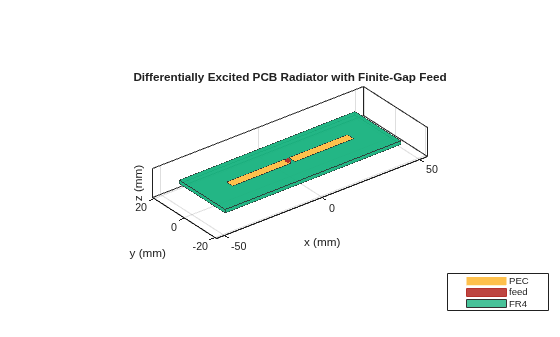
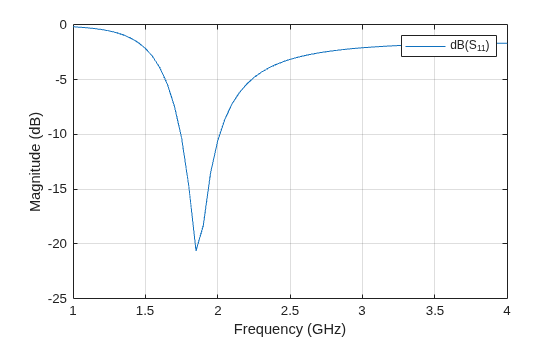
Compute and plot the reflection coefficient. The radiator resonates near 1.85 GHz with an input impedance close to 50 Ω, so the default 50 Ω reference gives a good match.
s = sparameters(p, linspace(1e9, 4e9, 61));
figure
rfplot(s)
Version History
Introduced in R2026b

