Legacy Serial
                Port
R2026bSend and receive data over mainboard baseboard serial port
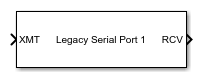
Legacy Serial Port block
To add a block to a model, double-click the canvas and start typing the block name. Then, select the block from the list.
Libraries:
Simulink Real-Time /
RS232 /
Mainboard
Description
The Send/Receive block sets up the serial interface to send and receive basic character streams. This block has basic First In, First Out (FIFO) Read blocks inside the subsystem. It generates output as an array of packed integers (settable at 8 bits, 16 bits, or 32 bits). Characters appear in the lower byte and received status information appears in the upper byte.
For more information, see RS-232 Serial Communication and RS-232 Legacy Drivers.
Ports
Input
Vector of the data used to transmit over the port.
Data Types: int8 | int16 | int32 | uint8 | uint16 | uint32
Output
Vector containing data that has been received from serial port.
Data Types: int8 | int16 | int32 | uint8 | uint16 | uint32
Parameters
Specify the serial port type for communications. Choose Legacy Serial
Port or USB Serial Port to specify the type
of port used. Or, choose Specify to manually specify the path
of the port used. For more information about serial ports, see RS-232 Serial Communication.
Dependencies
Setting Serial port type to Legacy Serial
Port or USB Serial Port displays the
Serial port number parameter in which you can specify the
port number.
Setting Serial port type to
Specify displays the Serial port
parameter in which you can specify the port path.
Programmatic Use
Block Parameter:
portType |
Specify the serial port number for communications.
If using USB-to-serial adapters, the target computer detects these adapters as
ttySUSB0, ttySUSB1, and so on in the order
that the adapters are connected to the serial devices.
The order of port assignment is retained through the power cycle of the target computer or serial device if there is no change in the connections to the ports.
Dependencies
This parameter is visible if Serial port type is set to
Legacy Serial Port or USB Serial
Port.
Programmatic Use
Block Parameter:
portNum |
Specify the serial port device path for communications. The path can be the device path of a Legacy Serial Port or USB Serial Port.
Dependencies
This parameter is visible if Serial port type is set to Specify.
Programmatic Use
Block Parameter: nodePath |
Select a baud for transmitting and receiving data through the modem.
Programmatic Use
Block Parameter:
baud |
Select the number of bits that encode a character.
Programmatic Use
Block Parameter:
width |
Select the number of stop bits for the character stream.
Programmatic Use
Block Parameter:
nstop |
Select a parity for checking data integrity.
Programmatic Use
Block Parameter:
parity |
To enable the Request To Send/Clear To Send (RTS/CTS) handshake of the Universal Asynchronous Receiver-Transmitter (UART) for flow control, select this check box. Serial controllers use the RTS/CTS handshake to prevent data loss due to hardware FIFO overflow on the device that you are sending to.
Usually, the interrupt service routine executes quickly enough to empty the FIFO. If your model gets FIFO overruns, select this check box.
Programmatic Use
Block Parameter:
ctsmode |
Enter the maximum number of elements that you want returned by a single call to this block. The block uses this parameter to set the output vector width.
If you select the Read to delimiter check box and if the block does not find the delimiter before it reads Receive maximum read characters, the output vector is empty.
Programmatic Use
Block Parameter:
maxread |
Enter the minimum number of characters to read. If the FIFO does not contain at least this number of characters, the output vector is empty.
Programmatic Use
Block Parameter:
minread |
For the block to return all characters in the FIFO, up to and including the specified delimiter, select this check box.
If the buffer has errors, such as framing errors, the modem returns characters regardless of the presence of the delimiter. These returned characters help diagnose errors such as mismatched baud rates.
If the block does not find the delimiter before it reads Receive maximum read characters, the output vector is empty.
Programmatic Use
Block Parameter:
usedelimiter |
Enter the numeric value of the character that is the message delimiter.
Any value from 0 to
255 is valid. The common case looks for
10 (line feed) or 13 (carriage
return).
Programmatic Use
Block Parameter:
delimiter |
This parameter specifies the data type of the receiver. The 8-bit data types produce a NULL-terminated character vector in the output vector.
For 16-bit and 32-bit data types, the first element contains the number of valid elements in the rest of the output vector.
For 8-bit data types, only the character data is in the output vector, and a NULL terminator is appended. The 16-bit or 32-bit wide data types cause the error status from the UART to be placed in the second byte of each data element. (The error status contains the parity, overrun, framing, and break bits.) The character data is in the bottom 8 bits of each element. The first element of the vector contains the number of data elements that follow.
Programmatic Use
Block Parameter:
odtype |
This parameter specifies the receive FIFO size in bytes.
Example: 1024
Programmatic Use
Block Parameter:
fifosize |
Data Types: int32
This parameter specifies the data type of the transmitter. The 8-bit data types require a NULL-terminated character vector in the input vector.
The 16-bit and 32-bit data types reserve the first full element to contain the number of elements to expect in the rest of the input vector. Only the low-order byte of each data element is sent. Setting this data type enables a wider data type to hold the bytes.
If the data stream requires a NULL byte, select one of the 16-bit or 32-bit data types. Because the 8-bit data types are NULL-terminated character vectors, the NULL byte terminates the character vector.
Programmatic Use
Block Parameter:
idtype |
Enter the base sample time or a multiple of the base sample time.
-1 means that sample time is inherited.
Programmatic Use
Block Parameter:
sampletime |
Version History
Introduced in R2008aThe RS232 mainboard blocks support connecting USB serial adapter ports. The
Serial port parameter of the Legacy Serial
Read block, Legacy Serial Write block, Legacy
Serial Setup block, Legacy Serial Port block, and
Legacy Serial Port F block means that you can select a
USB Serial Port or a Legacy Serial
Port.
MATLAB Command
You clicked a link that corresponds to this MATLAB command:
Run the command by entering it in the MATLAB Command Window. Web browsers do not support MATLAB commands.


Website auswählen
Wählen Sie eine Website aus, um übersetzte Inhalte (sofern verfügbar) sowie lokale Veranstaltungen und Angebote anzuzeigen. Auf der Grundlage Ihres Standorts empfehlen wir Ihnen die folgende Auswahl: .
Sie können auch eine Website aus der folgenden Liste auswählen:
So erhalten Sie die bestmögliche Leistung auf der Website
Wählen Sie für die bestmögliche Website-Leistung die Website für China (auf Chinesisch oder Englisch). Andere landesspezifische Websites von MathWorks sind für Besuche von Ihrem Standort aus nicht optimiert.
Amerika
- América Latina (Español)
- Canada (English)
- United States (English)
Europa
- Belgium (English)
- Denmark (English)
- Deutschland (Deutsch)
- España (Español)
- Finland (English)
- France (Français)
- Ireland (English)
- Italia (Italiano)
- Luxembourg (English)
- Netherlands (English)
- Norway (English)
- Österreich (Deutsch)
- Portugal (English)
- Sweden (English)
- Switzerland
- United Kingdom (English)