Designing Compensators for Plants with Time Delays
R2026bYou can design compensators for plants with time delays using Simulink® Control Design™ software. When opened from Simulink, Control System Designer creates a linear model of your plant. Within this model, you can represent time delays using either Padé approximations or exact delays.
To represent time delays using Padé approximations, specify the Padé order in the Block Parameters dialog box for each Simulink block with delays.
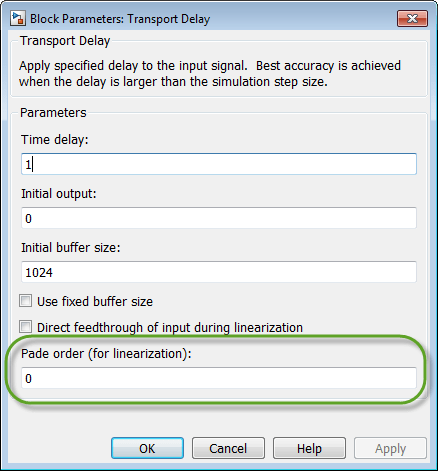
If you do not specify a Padé order for a block, Control System Designer uses exact delays by default when possible.
However, the following design methods and plots do not support systems with exact time delays:
Root locus plots
Pole-zero maps
PID automated tuning
IMC automated tuning
LQG automated tuning
Loop shaping automated tuning
For these design methods and plots, the app automatically computes a Padé approximation for any exact delays in your model using a default Padé order.
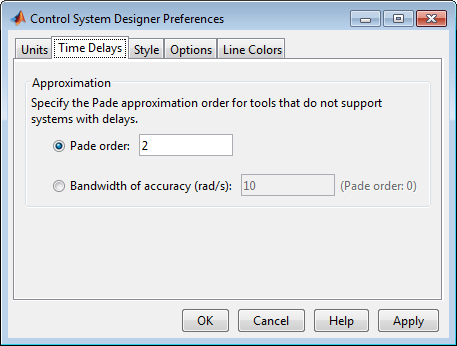
To specify the default order, in Control System Designer, on the Control System tab, click Preferences.
In the Control System Designer Preferences dialog box, on the Time Delays tab, specify one of the following:
Padé order — Specific Padé order.
Bandwidth of accuracy — Highest frequency at which the approximated response matches the exact response. The app computes and displays the corresponding Padé order.
For more information on designing compensators using Control System Designer, see Control System Designer Tuning Methods.

