Test Functions and Constrain Polyspace Code Prover Analysis for Ranges of Inputs and Outputs
R2026bFunctions that represent a physical or mathematical process can expect inputs within a specific range and produce outputs with a specific range. This example shows how you can test such functions by specifying the input and output ranges using range specification macros from the Polyspace® Test™ xUnit API. The example also demonstrates how using range specification macros enables Polyspace Code Prover™ to verify a function for a range of inputs.
Typically, when verifying the absence of runtime error in a function under test, Polyspace Code Prover verifies the function for the input values with which the test calls the function. When you use range specification macros, Code Prover can verify a function for an entire range.
For a list of range specification macros, see Range Specification Macros in Polyspace Test xUnit API.
Prerequisites
This example requires valid licenses for Polyspace Test and Polyspace static analysis products such as Polyspace Bug Finder™ and Polyspace Code Prover.
This topic describes test authoring using the Polyspace Test xUnit API. To compile these tests, you are required to know some file paths in advance. For your convenience, you can define environment variables to stand for the file paths, or otherwise include the file paths in your build. For more information, see Set Up C/C++ Testing and Code Profiling Using Self-Managed Builds.
Example Files
The source and test files required for this tutorial are in the folder <polyspaceroot>/polyspace/examples/doc_pstest/range_specification. Copy these files to a writable location and continue the tutorial. Here, <polyspaceroot> is the Polyspace installation folder, for example, /usr/local/bin/matlab/Polyspace/R2026b.
Inspect Function Under Test and Testing Requirements
Open the file src.cpp located in <polyspaceroot>/polyspace/examples/doc_pstest/range_specifiction/src. The function myLUT() implements a lookup table with ten different ranges for its input. It accepts a double value, checks which range the input falls in, and returns a double value based on that range.
double myLUT(double x) {
	if(x <= 0 || x > 100) {
		return -1;
	}

	if(x > 0 && x < 10) {
		return 3 / x;
	} else if(x >= 10 && x < 20) {
		return 22 / x;
	} else if(x >= 20 && x < 30) {
        return 8 / x;
	} else if(x >= 30 && x < 40) {
		return 42 / x;
	} else if(x >= 40 && x < 50) {
		return 17 / x;
	} else if(x >= 50 && x < 60) {
		return 53 / x;
	} else if(x >= 60 && x < 70) {
		return 29 / x;
	} else if(x >= 70 && x < 80) {
		return 67 / x;
	} else if(x >= 80 && x < 90) {
		return 34 / x;
	} else { // x >= 90 && x <= 100
	return 91 / x;
	}
}
if branch.Test for Individual Values in Each Range Manually
Say you want to test the function myLUT() for several values in each range. The contents of the file test/test_manual.cpp shows how you can manually test the function when the inputs are the upper and lower bound of each range. You see how Code Prover verifies the function when the upper and lower bounds are tested manually.
To manually test the bounds of the ranges, the code defines these arrays containing the minimum and maximum of each range:
// Tolerance for the test
constexpr double tol = 0.001;
// List of the lower bounds
double minlist[] = {1,10,20,30,40,50,60,70,80,90};
// List of the Upper bounds
double maxlist[] = {9,19,29,39,49,59,69,79,89,99};
// List of numerator used for calculating expected values
double out[] = {3, 22, 8, 42, 17, 53, 29, 67, 34, 91};
The test testRange_upperbound calls the function myLUT() in a loop using the upper bound of each range of the lookup table. Then the test checks the outputs against the expected values with the tolerance tol.
PST_SUITE(SuiteA);
PST_TEST(SuiteA, testRange_upperbound) {
	double in, tout;

	for(int iter = 0; iter < 10; ++iter) {
		in = maxlist[iter];
		tout = out[iter] / in;
		PST_VERIFY_EQ_APPROX(myLUT(in), tout, tol);
	}
}
The test testrange_lowerbound tests the outputs of the function when the inputs are the lower bounds of the ranges of the lookup table using similar technique.
To create and run the test executable, compile the source and test files together. Navigate to the folder range_specification. Then, at the command line, enter:
g++ src/src.cpp test/test_manual.cpp <PSTEST_SOURCE> -I <PSTEST_INCLUDE><PSTEST_SOURCE> and <PSTEST_INCLUDE>, see Set Up C/C++ Testing and Code Profiling Using Self-Managed Builds.These commands generate a test executable. When you run the test executable, Polyspace Test reports that the tests pass.
When you verify the source and tests using Polyspace Code Prover, the absence of runtime error in the function is verified for the input values with which the functions are tested. At the command line, enter:
polyspace-code-prover -sources src/src.cpp,test/test_manual.cpp -library pstunit -I <PSTEST_INCLUDE> -lang cpp 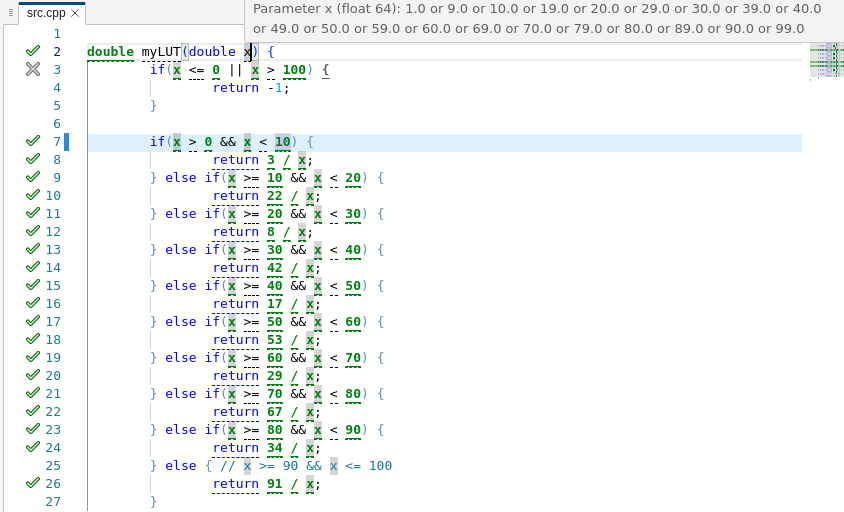
Test for Individual Values in Each Range Using Range Specification Macros
When you use range specification macros to test the upper and lower bounds of myLUT(), Code Prover can verify absence of runtime errors for all valid inputs to the function. You do not have to manually call the function for all possible inputs.
In the test testRange_upperbound, instead of manually calling the function with the upper bounds of the ranges, specify that the values to test are the upper bounds of the ranges:
PST_RANGE_SET_POLICY(PST_RANGE_UPPER_BOUND);for-loop, select the upper bound as the input value using the range specification macro PST_FLT_IN_RANGE.
in = PST_FLT_IN_RANGE(minlist[iter], maxlist[iter]);in has a value between minlist[iter] and maxlist[iter]. Because the macro PST_RANGE_SET_POLICY is set to PST_RANGE_UPPER_BOUND, Polyspace selects the upper bound of the range at runtime when this test is executed. When you run Code Prover on this code, the code is verified assuming that in is constrained between minlist[iter] and maxlist[iter].To test the output of the function within a tolerance of tol, assert that the output value is between out - tol and out + tol.
PST_TEST(SuiteA, testRange_upperbound) {
	double in, tout;
	PST_RANGE_SET_POLICY(PST_RANGE_UPPER_BOUND);
	for(int iter = 0; iter < 10; ++iter) {
		in = PST_FLT_IN_RANGE(minlist[iter], maxlist[iter]);
		tout = out[iter] / in;
		PST_ASSERT_FLT_IN_RANGE(myLUT(in), tout - tol, tout + tol);
	}
}testRange_lowerbound to select the lower bounds of the ranges in a similar way. The complete modified test code is given in the file test/test_range.cpp. To compile and run the modified tests, at the command line, enter:g++ src/src.cpp test/test_range.cpp <PSTEST_SOURCE> -I <PSTEST_INCLUDE><PSTEST_SOURCE> and <PSTEST_INCLUDE>, see Set Up C/C++ Testing and Code Profiling Using Self-Managed Builds.After you run the new test executable, Polyspace Test reports that the tests pass. To run Code Prover on the source and modified test, at the command line, enter:
polyspace-code-prover -sources src/src.cpp,test/test_range.cpp -library pstunit -I <PSTEST_INCLUDE> -lang cpp 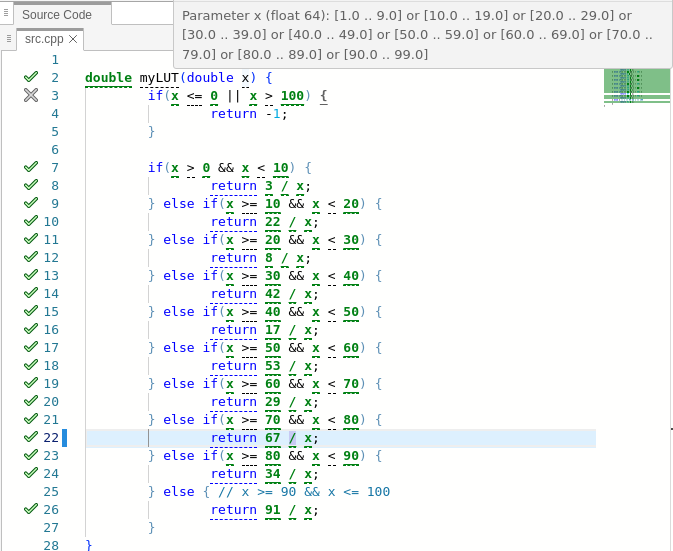
Code Prover now verifies the function for all valid input values.
See Also
Topics
- Write C/C++ Unit Tests Using Polyspace Test xUnit API and Run Tests at Command Line
- Group C/C++ Tests into Suites with Common Setup and Teardown Code
- Calculate C/C++ Code Coverage Using Self-Managed Builds
- Range Specification Macros in Polyspace Test xUnit API
- Test Functions That Operate on Arrays Using Range Specification Macros

