Sequence-to-Sequence Classification Using Deep Learning
R2026bThis example shows how to classify each time step of sequence data using a long short-term memory (LSTM) network.
To train a deep neural network to classify each time step of sequence data, you can use a sequence-to-sequence LSTM network. A sequence-to-sequence LSTM network enables you to make different predictions for each individual time step of the sequence data.
This example uses sensor data obtained from a smartphone worn on the body. The example trains an LSTM network to recognize the activity of the wearer from time series data representing accelerometer readings in three different directions.
Load Sequence Data
Load the human activity recognition data. The training data contains time series data for six people. The test data contains a single time series for a seventh person. Each sequence has three features and varies in length. The three features correspond to the accelerometer readings in three different directions.
load HumanActivityTrain
XTrain
XTrain = 6×1 cell array
3×64480 double
3×53696 double
3×56416 double
3×50688 double
3×51888 double
3×54256 double
Visualize one training sequence in a plot. Plot the first feature of the first training sequence and color the plot according to the corresponding activity.
X = XTrain{1}(1,:);
classes = categories(YTrain{1});

figure
for j = 1:numel(classes)
    label = classes(j);
    idx = find(YTrain{1} == label);
    hold on
    plot(idx,X(idx))
end
hold off

xlabel("Time Step")
ylabel("Acceleration")
title("Training Sequence 1, Feature 1")
legend(classes,Location="northwest")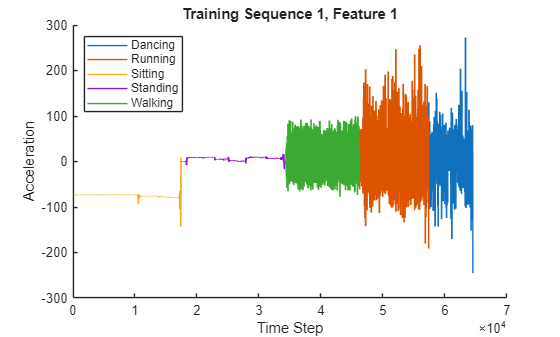
Define LSTM Network Architecture
Define the LSTM network architecture. Specify the input to be sequences of size 3 (the number of features of the input data). Specify an LSTM layer with 200 hidden units, and output the full sequence. Finally, specify five classes by including a fully connected layer of size 5, followed by a softmax layer.
numFeatures = 3;
numHiddenUnits = 200;
numClasses = 5;

layers = [ ...
    sequenceInputLayer(numFeatures)
    lstmLayer(numHiddenUnits,OutputMode="sequence")
    fullyConnectedLayer(numClasses)
    softmaxLayer];
Specify the training options.
Train using the Adam solver.
Train for 60 epochs.
Because the training data has sequences with rows and columns corresponding to channels and time steps, respectively, specify the input data format
"CTB"(channel, time, batch).To prevent the gradients from exploding, set the gradient threshold to 2.
Display the training progress in a plot and suppress the verbose output.
Monitor the accuracy of the network during training.
options = trainingOptions("adam", ...
    MaxEpochs=60, ...
    InputDataFormats="CTB", ...
    GradientThreshold=2, ...
    Plots="training-progress", ...
    Verbose=false, ...
    Metrics="accuracy");
Train the LSTM network using the trainnet function. For classification, use cross-entropy loss. By default, the trainnet function uses a GPU if one is available. Training on a GPU requires a Parallel Computing Toolbox™ license and a supported GPU device. For information on supported devices, see GPU Computing Requirements. Otherwise, the trainnet function uses the CPU. To select the execution environment manually, use the ExecutionEnvironment training option. Each mini-batch contains the whole training set, so the plot is updated once per epoch. The sequences are very long, so it might take some time to process each mini-batch and update the plot.
net = trainnet(XTrain,YTrain,layers,"crossentropy",options);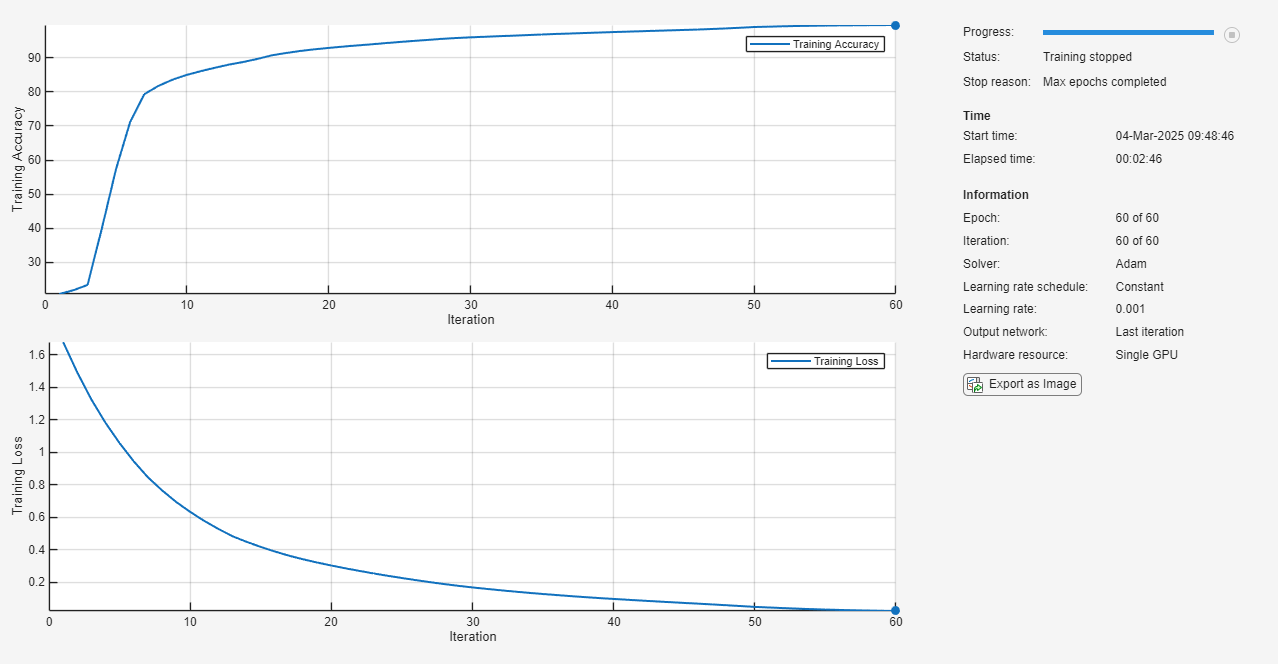
Test LSTM Network
Load the test data and classify the activity at each time step.
Load the human activity test data. XTest contains a single sequence of dimension 3. YTest contains sequence of categorical labels corresponding to the activity at each time step.
load HumanActivityTest
figure
XTest = XTest{1}';
plot(XTest)
xlabel("Time Step")
ylabel("Acceleration")
legend("Feature " + (1:numFeatures))
title("Test Data")
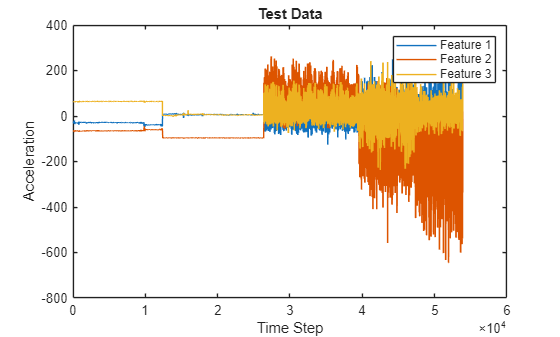
For single observation input, make predictions using the predict function. To make predictions using the GPU, first convert the data to gpuArray.
if canUseGPU
    XTest = gpuArray(XTest);
end
scores = predict(net,XTest);
To convert the prediction scores to labels, use the scores2label function.
Y = scores2label(scores,classes);
Alternatively, you can make predictions one time step at a time by using the predict function and returning the updated network state as an output. You can then use the state output to update the State property of the network. This is useful when you have the values of the time steps arriving in a stream. Usually, it is faster to make predictions on full sequences when compared to making predictions one time step at a time. For an example showing how to forecast future time steps by updating the network between single time step predictions, see Time Series Forecasting Using Deep Learning.
Calculate the accuracy of the predictions.
acc = sum(Y == YTest{1}')./numel(YTest{1})acc = 0.9983
Compare the predictions with the test data by using a plot.
figure
plot(Y,".-")
hold on
plot(YTest{1})
hold off

xlabel("Time Step")
ylabel("Activity")
title("Predicted Activities")
legend(["Predicted" "Test Data"])
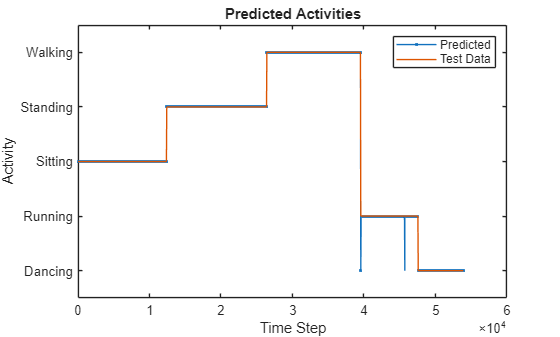
See Also
trainnet | trainingOptions | dlnetwork | lstmLayer | sequenceInputLayer
Topics
- Sequence Classification Using Deep Learning
- Train Sequence Classification Network Using Data with Imbalanced Classes
- Compare Deep Learning and ARMAX Models for Time Series Modeling
- Time Series Forecasting Using Deep Learning
- Sequence-to-Sequence Regression Using Deep Learning
- Sequence-to-One Regression Using Deep Learning
- Long Short-Term Memory Neural Networks
- Deep Learning in MATLAB

