PFC Controller Gains
R2026bCompute controller gains for power factor correction current and voltage loops
Since R2026b
PFC Controller Gains block
To add a block to a model, double-click the canvas and start typing the block name. Then, select the block from the list.
Libraries:
Power Converter Control with Motor Control Blockset /
Control /
Power Factor Correction
Description
Add-On Required: This feature requires the Power Converter Control with Motor Control Blockset add-on.
The PFC Controller Gains block computes controller gains for the current and voltage control loops of a power factor correction (PFC) boost converter. Use this block to generate PI controller parameters based on the converter component values and operating conditions, parameterized as shown in the following image.
The block outputs a controller parameters bus on the CtrlParams port. To close the control loops, connect this port to the CtrlParams input of the PFC Current Controller block, the PFC Voltage Controller block, or both.
The block provides three source modes for specifying converter parameters.
Compute from dialog parameters — Enter converter component values and operating conditions directly in the block parameters. Use this mode during initial design if you know the converter specifications at model build time and they do not change.
Compute from input ports — Supply the values through input signals. Use this mode if component values or operating conditions change during simulation, for example in a gain-scheduling or parameter-sweep study.
Custom inputs — Bypass automatic gain computation and specify the controller gains directly in the block dialog box. Use this mode if you have independently tuned gains or want to match gains from an existing controller design.
Use the Current Controller and Voltage
Controller parameters to select which gain sets appear in the output
bus. Selecting Current Controller adds the fields
kpcur and kicurTs to the
CtrlParams bus. Selecting Voltage
Controller adds the fields kpvolt and
kivoltTs. You can select both parameters to include all four
fields, or select only one to reduce the bus to the gains needed for that loop.
Examples
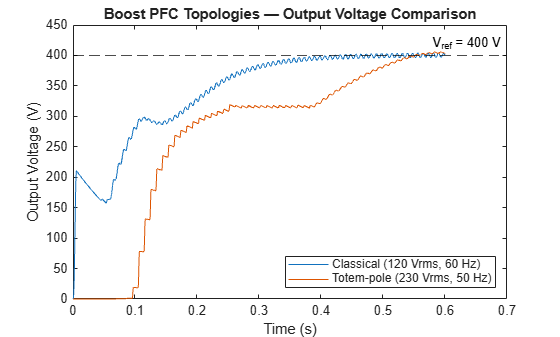
Design and Simulate Boost PFC Controllers
Design and simulation power factor correction (PFC) control for Boost converter.
Ports
Output
Controller parameters for PFC current and voltage loops, specified as a bus. Connect this port to the CtrlParams input of the PFC Current Controller block, the PFC Voltage Controller block, or both.
The bus contains up to four fields depending on which controller parameters you select:
kpcur— proportional gain for the current controller. This field is present only when Current Controller is selected.kicurTs— integral gain multiplied by the current controller sample time. This pre-scaled product is used directly by the discrete-time integrator in the PFC Current Controller block. This field is present only when Current Controller is selected.kpvolt— proportional gain for the voltage controller. This field is present only when Voltage Controller is selected.kivoltTs— integral gain multiplied by the voltage controller sample time. This pre-scaled product is used directly by the discrete-time integrator in the PFC Voltage Controller block. This field is present only when Voltage Controller is selected.
Data Types: bus
Input
Boost inductance of the PFC stage in henries, specified as a positive scalar. The block uses this value and the rated voltage and current to compute the current controller bandwidth and PI gains. Set this to match the physical inductor in your PFC boost stage.
Dependencies
To enable this port, set Source to
Compute from input ports.
Data Types: double | single
DC bus capacitance of the PFC stage in farads, specified as a positive scalar. The block uses this value and the rated voltage and current to compute the voltage controller bandwidth and PI gains. Set this to match the DC bus capacitor in your PFC boost stage.
Dependencies
To enable this port, set Source to
Compute from input ports.
Data Types: double | single
Rated output DC bus voltage in volts, specified as a positive scalar. The block uses this value as the operating point for linearizing the plant model and computing controller gains. Set this to the nominal DC bus voltage of your converter.
Dependencies
To enable this port, set Source to
Compute from input ports.
Data Types: double | single
Rated output current in amperes, specified as a positive scalar. The block uses this value to define the nominal load condition for the gain computation. Set this to the maximum continuous load current of your PFC converter.
Dependencies
To enable this port, set Source to
Compute from input ports.
Data Types: double | single
Rated peak AC input voltage in volts, specified as a positive scalar. The block uses this value to determine the input-to-output voltage ratio for the gain computation. Set this to the peak value of your AC grid voltage (for example, 230*sqrt(2) for a 230 V RMS grid).
Dependencies
To enable this port, set Source to
Compute from input ports.
Data Types: double | single
Rated AC grid frequency in hertz, specified as a positive scalar. The block uses this value to keep the voltage loop bandwidth below twice the grid frequency, preventing interaction with the rectified voltage ripple. Set this to 50 or 60 Hz to match your AC grid.
Dependencies
To enable this port, set Source to
Compute from input ports.
Data Types: double | single
Current controller sample time in seconds, specified as a positive scalar. The block uses this value to determine the discrete update rate for the current loop gain computation. Set this to match the PWM switching period or the sample time of your current controller.
Dependencies
To enable this port, set Source to
Compute from input ports.
Data Types: double | single
Voltage controller sample time in seconds, specified as a positive scalar. The block uses this value to determine the discrete update rate for the voltage loop gain computation. The voltage loop typically runs slower than the current loop; set this to 5–20 times the current controller sample time.
Dependencies
To enable this port, set Source to
Compute from input ports.
Data Types: double | single
Parameters
To edit block parameters interactively, use the Property Inspector. From the Simulink® Toolstrip, on the Simulation tab, in the Prepare gallery, select Property Inspector.
Option to include current controller gains in the output bus. When
selected, the block computes and outputs the current controller proportional
and integral gains as the fields kpcur and
kicurTs in the CtrlParams bus.
If cleared, the block omits these fields from the bus and does not compute
current loop gains.
Programmatic Use
To set the block parameter value programmatically, use
the set_param function.
| Parameter: | CCGains |
| Values: | "on" (default) | "off" |
Example: set_param(gcb,"CCGains","off")
Option to include voltage controller gains in the output bus. When
selected, the block computes and outputs the voltage controller proportional
and integral gains as the fields kpvolt and
kivoltTs in the CtrlParams bus.
If cleared, the block omits these fields from the bus and does not compute
voltage loop gains.
Programmatic Use
To set the block parameter value programmatically, use
the set_param function.
| Parameter: | VCGains |
| Values: | "on" (default) | "off" |
Example: set_param(gcb,"VCGains","off")
Specify the source of controller parameter computation.
Set to Compute from dialog parameters (default) to
compute the PI gains from converter specifications entered in the block
dialog box. This mode requires no input ports and is convenient for fixed
converter designs.
Set to Compute from input ports to supply converter
parameters through input ports at runtime. This mode enables gain scheduling
or parameter sweeps where component values or operating conditions vary
during simulation.
Set to Custom inputs to specify the PI gains directly
in the block dialog box, bypassing automatic computation. Use this mode if
you have independently tuned gains or want to match gains from an existing
controller design.
Programmatic Use
To set the block parameter value programmatically, use
the set_param function.
| Parameter: | CntrlParams |
| Values: | "Compute from dialog
parameters" (default) | "Compute from input ports" | "Custom inputs" |
Example: set_param(gcb,"CntrlParams","Compute from input
ports")
Boost inductance of the PFC stage in henries, specified as a positive scalar. The block uses this value along with the rated voltage and current to compute the current controller proportional and integral gains. Set this to match the physical inductor in your PFC boost stage.
Dependencies
This parameter is visible when Source is set to
Compute from dialog parameters.
Programmatic Use
To set the block parameter value programmatically, use
the set_param function.
| Parameter: | LBoost |
| Values: | "1.5e-4" (default) | positive scalar in quotes |
| Data Types: | char | string |
Example: set_param(gcb,"LBoost","2e-4")
DC bus capacitance of the PFC stage in farads, specified as a positive scalar. The block uses this value along with the rated voltage and current to compute the voltage controller gains. Set this to match the DC bus capacitor in your PFC boost stage.
Dependencies
This parameter is visible when Source is set to
Compute from dialog parameters.
Programmatic Use
To set the block parameter value programmatically, use
the set_param function.
| Parameter: | CBoost |
| Values: | "0.00195" (default) | positive scalar in quotes |
| Data Types: | char | string |
Example: set_param(gcb,"CBoost","0.002")
Rated output DC bus voltage in volts, specified as a positive scalar. The block uses this value as the operating point for linearizing the plant model and computing controller gains. Set this to the nominal DC bus voltage of your converter.
Dependencies
This parameter is visible when Source is set to
Compute from dialog parameters.
Programmatic Use
To set the block parameter value programmatically, use
the set_param function.
| Parameter: | VOut |
| Values: | "400" (default) | positive scalar in quotes |
| Data Types: | char | string |
Example: set_param(gcb,"VOut","450")
Rated output current in amperes, specified as a positive scalar. The block uses this value to define the nominal load condition for the gain computation. Set this to the maximum continuous load current of your PFC converter.
Dependencies
This parameter is visible when Source is set to
Compute from dialog parameters.
Programmatic Use
To set the block parameter value programmatically, use
the set_param function.
| Parameter: | IOut |
| Values: | "10" (default) | positive scalar in quotes |
| Data Types: | char | string |
Example: set_param(gcb,"IOut","15")
Rated peak AC input voltage in volts, specified as a positive scalar. The block uses this value to determine the input-to-output voltage ratio for the gain computation. Set this to the peak value of your AC grid voltage (for example, 230*sqrt(2) for a 230 V RMS grid).
Dependencies
This parameter is visible when Source is set to
Compute from dialog parameters.
Programmatic Use
To set the block parameter value programmatically, use
the set_param function.
| Parameter: | VIn |
| Values: | "230*sqrt(2)" (default) | positive scalar in quotes |
| Data Types: | char | string |
Example: set_param(gcb,"VIn","325")
Rated AC grid frequency in hertz, specified as a positive scalar. The block uses this value to keep the voltage loop bandwidth below twice the grid frequency to avoid interaction with the rectified ripple. Set this to 50 or 60 Hz to match your AC grid.
Dependencies
This parameter is visible when Source is set to
Compute from dialog parameters.
Programmatic Use
To set the block parameter value programmatically, use
the set_param function.
| Parameter: | FRated |
| Values: | "50" (default) | positive scalar in quotes |
| Data Types: | char | string |
Example: set_param(gcb,"FRated","60")
Sample time for the current control loop in seconds, specified as a positive scalar. The block uses this value to determine the discrete update rate for the current loop gain computation. Set this to match the PWM switching period or the sample time of your current controller.
Dependencies
This parameter is visible when Source is set to
Compute from dialog parameters.
Programmatic Use
To set the block parameter value programmatically, use
the set_param function.
| Parameter: | TsCur |
| Values: | "5e-6" (default) | positive scalar in quotes |
| Data Types: | char | string |
Example: set_param(gcb,"TsCur","10e-6")
Sample time for the voltage control loop in seconds, specified as a positive scalar. The block uses this value to determine the discrete update rate for the voltage loop gain computation. The voltage loop typically runs slower than the current loop; set this to 5–20 times the current controller sample time.
Dependencies
This parameter is visible when Source is set to
Compute from dialog parameters.
Programmatic Use
To set the block parameter value programmatically, use
the set_param function.
| Parameter: | TsVolt |
| Values: | "50e-6" (default) | positive scalar in quotes |
| Data Types: | char | string |
Example: set_param(gcb,"TsVolt","100e-6")
Integral gain for the current controller, specified as a positive scalar. Increasing this value reduces steady-state current error faster but can cause overshoot if set too high. Use this parameter if you want to bypass the automatic gain computation and specify gains directly.
Dependencies
This parameter is visible when Source is set to
Custom inputs.
Programmatic Use
To set the block parameter value programmatically, use
the set_param function.
| Parameter: | Kicur |
| Values: | "400" (default) | positive scalar in quotes |
| Data Types: | char | string |
Example: set_param(gcb,"Kicur","500")
Custom current controller sample time in seconds, specified as a positive scalar. The block uses this value to set the discrete execution rate for the current controller if you use custom gains. Set this to match the PWM switching period of your PFC converter.
Dependencies
This parameter is visible when Source is set to
Custom inputs.
Programmatic Use
To set the block parameter value programmatically, use
the set_param function.
| Parameter: | TsCur1 |
| Values: | "5e-6" (default) | positive scalar in quotes |
| Data Types: | char | string |
Example: set_param(gcb,"TsCur1","10e-6")
Proportional gain for the voltage controller, specified as a positive scalar. Increasing this value speeds up voltage regulation but might cause oscillation or interact with the inner current loop. Use this parameter if you want to bypass the automatic gain computation and specify gains directly.
Dependencies
This parameter is visible when Source is set to
Custom inputs.
Programmatic Use
To set the block parameter value programmatically, use
the set_param function.
| Parameter: | Kpvolt |
| Values: | "0.5" (default) | positive scalar in quotes |
| Data Types: | char | string |
Example: set_param(gcb,"Kpvolt","1")
Integral gain for the voltage controller, specified as a positive scalar. Increasing this value eliminates steady-state voltage error faster but can cause overshoot or instability. Use this parameter if you want to bypass the automatic gain computation and specify gains directly.
Dependencies
This parameter is visible when Source is set to
Custom inputs.
Programmatic Use
To set the block parameter value programmatically, use
the set_param function.
| Parameter: | Kivolt |
| Values: | "5" (default) | positive scalar in quotes |
| Data Types: | char | string |
Example: set_param(gcb,"Kivolt","10")
Custom voltage controller sample time in seconds, specified as a positive scalar. The block uses this value to set the discrete execution rate for the voltage controller if you use custom gains. The voltage loop typically runs slower than the current loop to maintain loop decoupling.
Dependencies
This parameter is visible when Source is set to
Custom inputs.
Programmatic Use
To set the block parameter value programmatically, use
the set_param function.
| Parameter: | TsVolt1 |
| Values: | "50e-6" (default) | positive scalar in quotes |
| Data Types: | char | string |
Example: set_param(gcb,"TsVolt1","100e-6")
Extended Capabilities
C/C++ Code Generation
Generate C and C++ code using Simulink® Coder™.
Version History
Introduced in R2026b
MATLAB Command
You clicked a link that corresponds to this MATLAB command:
Run the command by entering it in the MATLAB Command Window. Web browsers do not support MATLAB commands.


Website auswählen
Wählen Sie eine Website aus, um übersetzte Inhalte (sofern verfügbar) sowie lokale Veranstaltungen und Angebote anzuzeigen. Auf der Grundlage Ihres Standorts empfehlen wir Ihnen die folgende Auswahl: .
Sie können auch eine Website aus der folgenden Liste auswählen:
So erhalten Sie die bestmögliche Leistung auf der Website
Wählen Sie für die bestmögliche Website-Leistung die Website für China (auf Chinesisch oder Englisch). Andere landesspezifische Websites von MathWorks sind für Besuche von Ihrem Standort aus nicht optimiert.
Amerika
- América Latina (Español)
- Canada (English)
- United States (English)
Europa
- Belgium (English)
- Denmark (English)
- Deutschland (Deutsch)
- España (Español)
- Finland (English)
- France (Français)
- Ireland (English)
- Italia (Italiano)
- Luxembourg (English)
- Netherlands (English)
- Norway (English)
- Österreich (Deutsch)
- Portugal (English)
- Sweden (English)
- Switzerland
- United Kingdom (English)