What Are Organized and Unorganized Point Clouds?
Introduction
There are two types of point clouds: organized and unorganized. These terms describe how point cloud data is stored, either in a structured manner or in an arbitrary fashion. An organized point cloud resembles an image with its data divided into rows and columns. In contrast, unorganized point clouds consist of a single stream of 3-D coordinates, each coordinate representing a single point.
Organized point clouds are M-by-N-by-3 arrays, with the three dimensions representing the x-, y-, and z- coordinates of the points. Unorganized point clouds are M-by-3 matrices, where M is the total number of points in the point cloud.
The decision to use an organized or an unorganized point cloud for your application can
depend on various factors, such as algorithm requirements or memory constraints. Some
algorithms take advantage of the organized structure of point clouds for more efficient
processing because it includes spatial information. For example, segmentation using
functions like segmentLidarData or segmentGroundFromLidarData can benefit from this organized structure.
Convert Organized Point Cloud to an Unorganized Point Cloud
To convert an organized point cloud to an unorganized point cloud, you can use the
removeInvalidPoints object function. This
function removes the NaN coordinate values from the point cloud and
returns an unorganized (M-by-3) point cloud. Converting an organized
point cloud into an unorganized format has advantages: it reduces the memory needed to store
the point cloud and makes it easier to inspect the numerical x-,
y-, and z- values of each point.
Note that aerial point clouds are unorganized by nature, so the following features for aerial point clouds only accept unorganized point clouds:
In these cases, the point clouds are unorganized from the beginning, so there is no need
to use removeInvalidPoints.
Convert Unorganized Point Cloud to an Organized Point Cloud
Some deep learning segmentation networks, such as SqueezeSegv1/v2 and SalsaNext, process only organized point clouds. In addition, organized point clouds are used in ground plane extraction and key point detection methods. This makes organized point cloud conversion an important preprocessing step for some Lidar Toolbox™ workflows.
Functions that require organized point clouds include:
You can convert unorganized point clouds to organized point clouds by using the
pcorganize
function. The underlying algorithm uses spherical projection to represent the 3-D point
cloud data in a 2-D (organized) form. It requires certain corresponding lidar sensor
parameters, specified using the lidarParameters
object, in order to convert the data.
You can also use pcorganize to
restructure a point cloud so that it matches the format required by a pretrained model. For
example, if the pretrained model was trained on data from an HDL-32 sensor and your data is
from an HDL-64 sensor, you can use pcorganize to
convert the point cloud to the required sensor format.
Lidar Sensor Parameters
The sensor parameters required for conversion differ based on whether the lidar sensor has a uniform beam or a gradient beam configuration. A lidar sensor is created by stacking laser scanners vertically. Each laser scanner releases a laser pulse and rotates to capture a 3-D point cloud.
When the laser scanners are stacked with equal spacing, the lidar sensor has a uniform beam (laser scanner) configuration.

To convert unorganized point clouds captured using a lidar sensor with a uniform beam configuration, you must specify these parameters from the sensor handbook:
Vertical resolution — Number of channels in the vertical direction, consisting of the number of lasers. Typical values include 32 and 64.
Horizontal resolution — Number of channels in the horizontal direction. Typical values include 512 and 1024.
Vertical field of view — Vertical field of view, in degrees. The sensor in the preceding picture has a vertical field of view of 45 degrees.
For an example, see Create a Lidar Parameters Object.
When the beams at the horizon are tightly packed, and those toward the top and bottom of the sensor field of view are more spaced out, the lidar sensor has a gradient beam configuration.
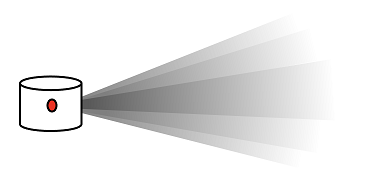
To convert unorganized point clouds captured using a lidar sensor with a gradient beam configuration, you must specify these parameters from the sensor handbook:
Horizontal resolution — Number of channels in the horizontal direction. Typical values include 512 and 1024.
Vertical beam angles — Angular position of each vertical channel, in degrees.
For an example, see Create Lidar Parameters Object for Gradient Lidar Sensor.
Supported Sensors
The lidarParameters object can automatically load the sensor
parameters for some popular lidar sensors. These sensors are supported:
| Sensor Name | Input |
|---|---|
| Velodyne® HDL-64E | 'HDL64E' |
| Velodyne HDL-32E | 'HDL32E' |
| Velodyne VLP16 | 'VLP16' |
| Velodyne VLP32C | 'VLP32C' |
| Velodyne VLP128 | 'VLS128' |
| Velodyne Puck LITE | 'PuckLITE' |
| Velodyne Puck Hi-Res | 'PuckHiRes' |
| Ouster® OS0-32 | OS0-32 |
| Ouster OS0-64 | OS0-64 |
| Ouster OS0-128 | OS0-128 |
| Ouster OS1Gen1-32 | OS1Gen1-32 |
| Ouster OS1Gen1-64 | OS1Gen1-64 |
| Ouster OS1Gen1-128 | OS1Gen1-128 |
| Ouster OS1Gen2-32 | OS1Gen2-32 |
| Ouster OS1Gen2-64 | OS1Gen2-64 |
| Ouster OS1Gen2-128 | OS1Gen2-128 |
| Ouster OS2-32 | OS2-32 |
| Ouster OS2-64 | OS2-64 |
| Ouster OS2-128 | OS2-128 |
Maintain Organized Structure of Point Clouds
In some cases, you might need to select a subset of a point cloud to process. For
example, to select a subset of points from an organized point cloud while preserving its
organized structure, use the select object function with the
OutputSize name-value argument set to
"full".
ptCloudOut = select(ptCloudIn,indices,OutputSize="full");
