OPD
R2026bDescription
Add-On Required: This feature requires the Optical Design and Simulation Library for Image Processing Toolbox add-on.
An OPD object stores the result of the optical path length
(OPL) and optical path difference (OPD) analysis for an optical system.
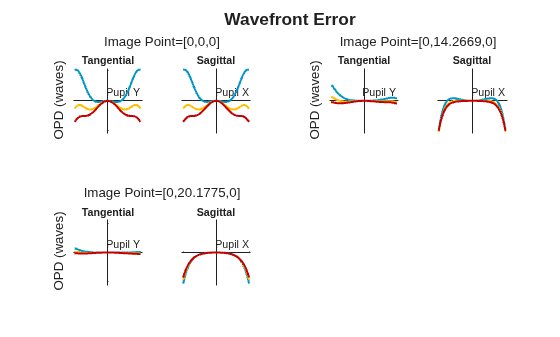
You can visualize the OPD results as either an OPD fan chart or an OPD map in 2-D by
using the show object
function.
Creation
Create an OPD object by using the opd object
function of the opticalSystem object.
Properties
This property is read-only.
Optical path difference values, represented as a
numRays-by-1 numeric vector. Units are in millimeters.
numRays is the number of rays that reached the last surface
of the optical system. The maximum value of numRays is the
number of points in the sampling grid, which you can determine from the
SamplingGrid argument used to create this object.
Note
The RMS and PeakToValley properties
store wavefront error in waves, not millimeters. To convert raw
OpticalPathDifference values to waves, divide by the
wavelength in millimeters (Wavelength * 1e-6).
Data Types: double
This property is read-only.
Optical path length values, represented as a numRays-by-1
numeric vector. Units are in millimeters. numRays is the number
of rays that reached the last surface of the optical system. The maximum value of
numRays is the number of points in the sampling grid, which
you can determine from the SamplingGrid argument used to
create this object.
Data Types: double
This property is read-only.
Normalized pupil coordinates, represented as a numRays-by-2 numeric matrix. numRays is the number of rays that reached the last surface of the optical system. Each row of the matrix contains the normalized xy-coordinates of the aberrated entrance pupil through which the rays have been traced.
Data Types: double
This property is read-only.
Source field point of the ray bundle, represented as a FieldAngle or FieldPosition object.
This property is read-only.
Wavelength of light, represented as a positive scalar. Units are in nanometers.
Data Types: double
This property is read-only.
Reference sphere information for OPD computation, represented as a structure with these fields:
Center— 1-by-3 vector representing the center of the reference sphere in global coordinates.ReferencePlanePoint— 1-by-3 vector representing where the chief ray intersects the reference plane in global coordinates.
For telecentric systems, both fields contain [NaN NaN
NaN].
This property is read-only.
Reference plane information for OPD computation, represented as a structure with these fields:
Normal— 1-by-3 unit normal vector of the reference plane in global coordinates.Point— 1-by-3 vector representing where the chief ray intersects the reference plane in global coordinates.
This property is read-only.
RMS wavefront error, represented as a numeric scalar. Units are in waves. The RMS wavefront is the standard deviation of the optical path difference values.
Data Types: double
This property is read-only.
Peak-to-valley wavefront error, represented as a numeric scalar. Units are in waves. The peak-to-valley value is the difference between the maximum and minimum optical path difference values.
Data Types: double
Object Functions
show | Plot analysis result |
Examples
Import a double Gauss lens optical system from a ZMX file into the workspace.
opsys = zmximport("DoubleGaussLens.zmx");Create a hexapolar sampling grid.
sg = samplingGrid("Hexapolar",30);Trace rays through the optical system.
rb = traceRays(opsys,SamplingGrid=sg);
Compute the OPD using data from the ray bundle.
opdr = opd(opsys,rb);
Display the OPD results as a fan chart.
hfan = show(opdr,Legend="off"); title("Wavefront Error")
Version History
Introduced in R2026b
See Also
opd | OPDFanChart | OPDMapChart | opticalSystem | fieldPoint
MATLAB Command
You clicked a link that corresponds to this MATLAB command:
Run the command by entering it in the MATLAB Command Window. Web browsers do not support MATLAB commands.
Website auswählen
Wählen Sie eine Website aus, um übersetzte Inhalte (sofern verfügbar) sowie lokale Veranstaltungen und Angebote anzuzeigen. Auf der Grundlage Ihres Standorts empfehlen wir Ihnen die folgende Auswahl: .
Sie können auch eine Website aus der folgenden Liste auswählen:
So erhalten Sie die bestmögliche Leistung auf der Website
Wählen Sie für die bestmögliche Website-Leistung die Website für China (auf Chinesisch oder Englisch). Andere landesspezifische Websites von MathWorks sind für Besuche von Ihrem Standort aus nicht optimiert.
Amerika
- América Latina (Español)
- Canada (English)
- United States (English)
Europa
- Belgium (English)
- Denmark (English)
- Deutschland (Deutsch)
- España (Español)
- Finland (English)
- France (Français)
- Ireland (English)
- Italia (Italiano)
- Luxembourg (English)
- Netherlands (English)
- Norway (English)
- Österreich (Deutsch)
- Portugal (English)
- Sweden (English)
- Switzerland
- United Kingdom (English)