Generate HDL and HLS Code from an LMS Filter Algorithm
R2026bThis example shows how to generate HDL and HLS code from a MATLAB® design that implements an LMS (Least Mean Squares) adaptive filter.
LMS Filter MATLAB Design
The MATLAB code used in this example implements an LMS adaptive filter. In communications and audio processing systems, LMS filters identify an FIR filter signal that is embedded in noise. The filter adaptively calculates optimal coefficients to minimize the difference between the output signal and a desired signal.
design_name = "mlhdlc_lms_fcn";
testbench_name = "mlhdlc_lms_noise_canceler_tb";
The MATLAB function, mlhdlc_lms_fcn, accepts an input signal and a desired signal, then updates filter weights using the least mean squares algorithm. The function uses helper functions to calculate tapped delay lines, tree-structured summation of weighted inputs, and weight updates.
To view the function, enter:
open(design_name);
LMS Filter MATLAB Test Bench
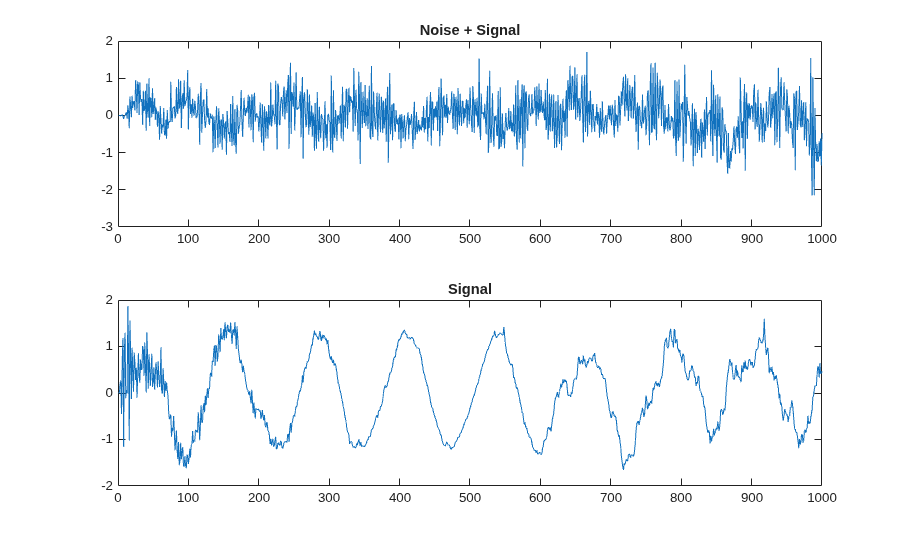
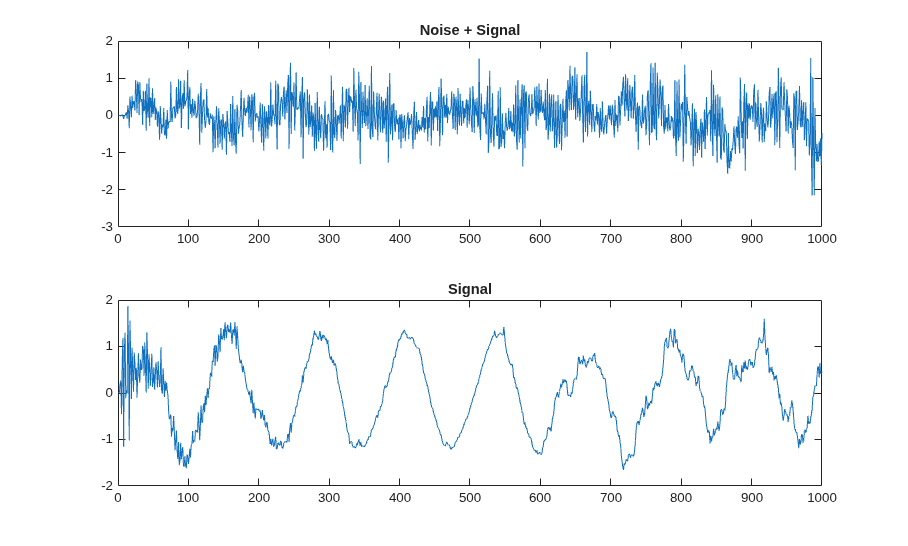
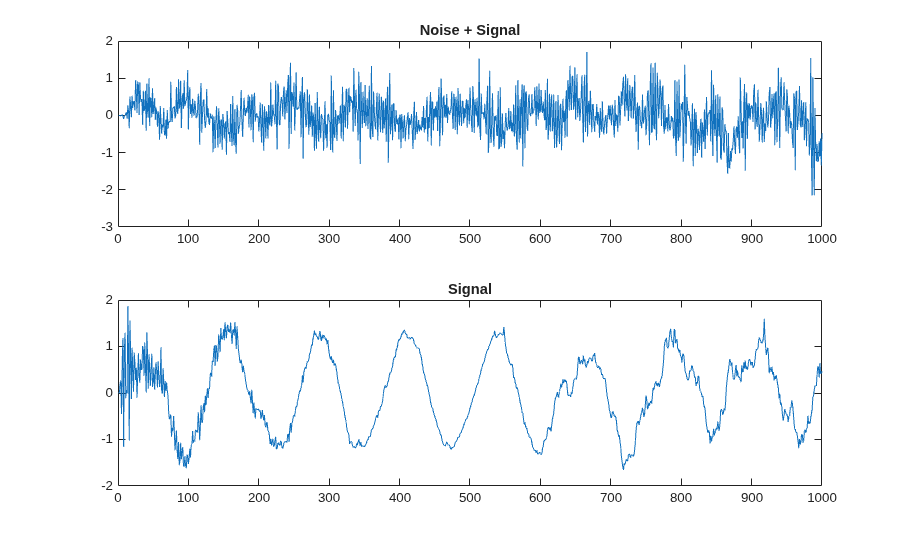
The test bench file, mlhdlc_lms_noise_canceler_tb, verifies the behavior of the MATLAB function by generating a signal corrupted with noise and using the LMS filter to cancel the noise.
To view the test bench, enter:
open(testbench_name);
Simulate the Design
To check for run-time errors, simulate the design by running the test bench. In the MATLAB Command Window, enter:
mlhdlc_lms_noise_canceler_tb;
Generate HDL Code
Create a fixed-point configuration object and an HDL configuration object by using the coder.config function. Associate the test bench with both configuration objects.
fixptCfg = coder.config("fixpt");
fixptCfg.TestBenchName = testbench_name;
hdlCfg = coder.config("hdl");
hdlCfg.TestBenchName = testbench_name;
Specify the synthesis tool, chip family, device name, package name, and speed value:
hdlCfg.SynthesisTool = "Xilinx Vivado";
hdlCfg.SynthesisToolChipFamily = "Artix7";
hdlCfg.SynthesisToolDeviceName = "xa7a100t";
hdlCfg.SynthesisToolPackageName = "csg324";
hdlCfg.SynthesisToolSpeedValue = "-1I";
Generate HDL code:
codegen("-float2fixed", "fixptCfg", "-config", "hdlCfg", design_name, ...
    "-launchreport");
===================================================
Design Name: <a href="matlab:edit('/tmp/Bdoc26b_3351752_3512615/tp7bd483ff/hdlcoder-ex55898300/mlhdlc_lms_fcn.m')">mlhdlc_lms_fcn</a>
Test Bench Name: <a href="matlab:edit('/tmp/Bdoc26b_3351752_3512615/tp7bd483ff/hdlcoder-ex55898300/mlhdlc_lms_noise_canceler_tb.m')">mlhdlc_lms_noise_canceler_tb</a>
===================================================

Input types not specified for design(s) 'mlhdlc_lms_fcn', inferring types by simulating the first test bench: 'mlhdlc_lms_noise_canceler_tb' in the base workspace.

============= Step1: Analyze Floating-Point Code ==============

Code generation successful.


============= Step1a: Verify Floating-Point Code ==============

### Analyzing the design 'mlhdlc_lms_fcn'
### Analyzing the test bench(es) 'mlhdlc_lms_noise_canceler_tb'
### Begin Floating-Point Simulation (Instrumented)
### Floating-Point Simulation Completed in   4.5114 sec(s)
### Elapsed Time:             5.8112 sec(s)

============= Step2: Propose Types Based on Range Information ==============


============= Step3: Generate Fixed-Point Code ==============

### Generating Fixed-Point MATLAB Code <a href="matlab:edit('/tmp/Bdoc26b_3351752_3512615/tp7bd483ff/hdlcoder-ex55898300/codegen/mlhdlc_lms_fcn/fixpt/mlhdlc_lms_fcn_fixpt.m')">mlhdlc_lms_fcn_fixpt</a> Using Proposed Types
### Generating Fixed-Point MATLAB Design Wrapper <a href="matlab:edit('/tmp/Bdoc26b_3351752_3512615/tp7bd483ff/hdlcoder-ex55898300/codegen/mlhdlc_lms_fcn/fixpt/mlhdlc_lms_fcn_wrapper_fixpt.m')">mlhdlc_lms_fcn_wrapper_fixpt</a>
### Generating Mex file for ' mlhdlc_lms_fcn_wrapper_fixpt '
Code generation successful: <a href="matlab: emlcprivate('emcOpenReport','/tmp/Bdoc26b_3351752_3512615/tp7bd483ff/hdlcoder-ex55898300/codegen/mlhdlc_lms_fcn/fixpt/reports/mlhdlc_lms_fcn_wrapper_fixpt_mex/html/report.mldatx');">View report</a>
### Generating Type Proposal Report for 'mlhdlc_lms_fcn' <a href="matlab:web('/tmp/Bdoc26b_3351752_3512615/tp7bd483ff/hdlcoder-ex55898300/codegen/mlhdlc_lms_fcn/fixpt/mlhdlc_lms_fcn_report.html', '-new')">mlhdlc_lms_fcn_report.html</a>

===================================================
Code generation successful.
### Begin MATLAB to HDL Code Generation...
### Working on DUT: mlhdlc_lms_fcn_fixpt.
### Using TestBench: mlhdlc_lms_noise_canceler_tb.
### Begin VHDL Code Generation
### Working on mlhdlc_lms_fcn_fixpt as <a href="matlab:edit('/tmp/Bdoc26b_3351752_3512615/tp7bd483ff/hdlcoder-ex55898300/codegen/mlhdlc_lms_fcn/hdlsrc/mlhdlc_lms_fcn_fixpt.vhd')">mlhdlc_lms_fcn_fixpt.vhd</a>.
### Generating package file <a href="matlab:edit('/tmp/Bdoc26b_3351752_3512615/tp7bd483ff/hdlcoder-ex55898300/codegen/mlhdlc_lms_fcn/hdlsrc/mlhdlc_lms_fcn_fixpt_pkg.vhd')">mlhdlc_lms_fcn_fixpt_pkg.vhd</a>.
### Generating Resource Utilization Report <a href="matlab:hdlcoder.report.openDdg('/tmp/Bdoc26b_3351752_3512615/tp7bd483ff/hdlcoder-ex55898300/codegen/mlhdlc_lms_fcn/hdlsrc/resource_report.html')">resource_report.html</a>.
### Generating Optimization report
### To rerun codegen evaluate the following commands...

---------------------
cgi    = load('/tmp/Bdoc26b_3351752_3512615/tp7bd483ff/hdlcoder-ex55898300/codegen/mlhdlc_lms_fcn/hdlsrc/codegen_info.mat');
cfg    = cgi.CodeGenInfo.codegenSettings;
fxpCfg = cgi.CodeGenInfo.fxpCfg;
codegen -float2fixed fxpCfg -config cfg -report
---------------------

### Generating HDL Conformance Report <a href="matlab:web('/tmp/Bdoc26b_3351752_3512615/tp7bd483ff/hdlcoder-ex55898300/codegen/mlhdlc_lms_fcn/hdlsrc/mlhdlc_lms_fcn_fixpt_hdl_conformance_report.html')">mlhdlc_lms_fcn_fixpt_hdl_conformance_report.html</a>.
### HDL Conformance check complete with 0 errors, 2 warnings, and 0 messages.
### Code generation successful: To view the report, open('codegen/mlhdlc_lms_fcn/hdlsrc/html/report.mldatx')
Generate HLS Code
Create a fixed-point configuration object and an HLS configuration object by using the coder.config function. Associate the test bench with both configuration objects and enable simulation.
fixptCfg = coder.config("fixpt");
fixptCfg.TestBenchName = testbench_name;
hlsCfg = coder.config("hls");
hlsCfg.TestBenchName = testbench_name;
hlsCfg.GenerateHLSTestBench = true;
hlsCfg.SimulateGeneratedCode = true;
Specify the synthesis tool, chip family, device name, package name, and speed value:
hlsCfg.SynthesisTool = "Xilinx Vitis HLS";
hlsCfg.SynthesisToolChipFamily = "Artix7";
hlsCfg.SynthesisToolDeviceName = "xa7a100t";
hlsCfg.SynthesisToolPackageName = "csg324";
hlsCfg.SynthesisToolSpeedValue = "-1I";
Generate HLS code:
codegen("-float2fixed", "fixptCfg", "-config", "hlsCfg", design_name, ...
  "-launchreport");
