Verifikation
R2026bVerwenden Sie Software-in-the-Loop- (SIL) und Processor-in-the-Loop-Ausführung (PIL), um das numerische Verhalten von aus MATLAB Funktionen generiertem Code zu überprüfen. Bei einer Software-in-the-Loop-Ausführung (SIL) wird der generierte Quellcode kompiliert und als separater Prozess auf Ihrem Entwicklungscomputer ausgeführt. Eine PIL-Ausführung benötigt eine Ziel-Konnektivitätskonfiguration. Die Ausführung querübersetzt generierten Quellcode, lädt daraufhin Objektcode herunter und führt diesen auf Ihrer Zielhardware aus. Sie können das numerische Verhalten verifizieren, indem Sie die Ergebnisse der SIL- oder PIL-Ausführung mit den Ergebnissen der ursprünglichen MATLAB-Funktionen vergleichen.
Sie können nachverfolgbaren Code generieren, der Sie dabei unterstützt, das Fehlen unbeabsichtigter Funktionen zu überprüfen, zu verstehen, wie der generierte Code Ihren Algorithmus implementiert und die Qualität des generierten Codes zu bewerten.
Objekte
Funktionen
Themen
SIL- und PIL-Tests
- Code Verification Through Software-in-the-Loop and Processor-in-the-Loop Execution
A workflow that uses SIL and PIL execution to verify the numerical behavior of generated MATLAB code. - Software-in-the-Loop Execution with the MATLAB Coder App
Use the MATLAB Coder app to verify the numerical behavior of generated C/C++ code. - Software-in-the-Loop Execution from Command Line
Use MATLAB commands to verify the numerical behavior of generated C/C++ code. - Software-in-the-Loop Execution for MATLAB Function with Multiple Signatures
Generate a SIL MEX file for multiple signatures. - Debug Generated Code During SIL or PIL Execution
Use a debugger to understand the behavior of generated code. - Create PIL Target Connectivity Configuration for MATLAB
Customize PIL execution for your target environment. - Host-Target Communication for MATLAB PIL Execution
Use thertiostreamAPI for communication between your development computer and target during PIL execution. - Specify Hardware Timer for MATLAB
Specify a hardware timer using the Code Replacement Tool. - Custom Toolchain Directives Required for Code Execution Profiling
Specify compiler directives for building PIL application that supports code execution profiling. - Processor-in-the-Loop Execution with the MATLAB Coder App
Use the MATLAB Coder app to verify the numerical behavior of cross-compiled object code. - Processor-in-the-Loop Execution from Command Line
Use MATLAB commands to verify the numerical behavior of cross-compiled object code. - PIL Execution with ARM Cortex-A at the Command Line
This example shows how to set up a PIL execution to verify generated code at the command line. - PIL Execution with ARM Cortex-A by Using the MATLAB Coder App
PIL Execution with App. - Verification of Code Generation Assumptions
PIL execution checks Hardware tab settings. - Speed Up SIL/PIL Execution by Disabling Constant Input Checking and Global Data Synchronization
Configure code generation parameters to turn off constant input checking or global data synchronization for SIL or PIL executions. - SIL/PIL Execution Support and Limitations
SIL and PIL execution support for code generation features.
Codenachverfolgung
- Interactively Trace Between MATLAB Code and Generated C/C++ Code
Visualize the mapping between the MATLAB code and the generated C/C++ code. - Include Comments in Generated C/C++ Code
Include MATLAB source code as comments in the generated code. Include function help text and function signature in function banner.
Polyspace-Verifikation
- Polyspace Verification of C/C++ Code Generated by MATLAB Coder
Check for run-time errors or defects in generated C/C++ code.
Berichterstellung
- Highlight Potential Data Type Issues in a Report
Highlight MATLAB code that results in double-precision, single-precision, or expensive fixed-point operations. - Find Potential Data Type Issues in Generated Code
Highlight potential data type issues in report.
Enthaltene Beispiele
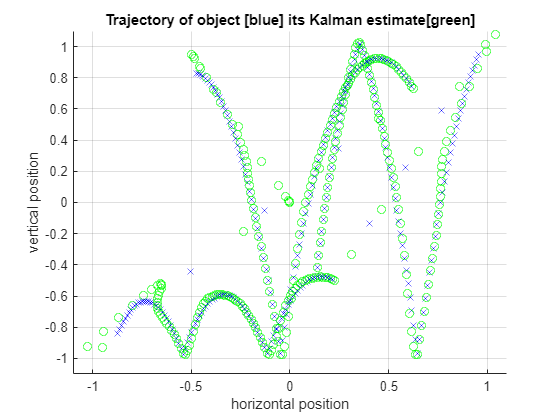
SIL and PIL Verification for Deployment on Raspberry Pi
Verify the generated code by using the software-in-the-loop (SIL) and processor-in-the-loop (PIL) executions

