Generate Code and Simulate Models in a Project
R2026bThis example shows how to use the code generation template for a new Project. The code generation project template for Project includes multiple models. The project template also provides utilities (.m scripts) that help you generate controller code and run simulations of the harness model.
Create a Project
Create a new Project from the code generation project template.
To create this project from the Simulink® start page, in the Command Window, type:
simulink
Select the Code Generation template from the start page, and create the exampleCodeGen project.
Generate Code
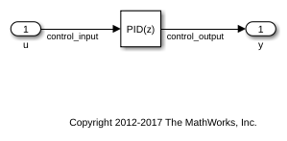
Generate controller code for the feedback_control.slx model.
To generate controller code, select the Project Shortcuts tab and select the Generate Controller Code shortcut.
This shortcut runs the generate_controller_code.m script in the utilities folder of the project. The script builds the feedback_control.slx model in the controller folder of the project.
### Searching for referenced models in model 'feedback_control'.
### Unable to find Simulink cache file "feedback_control.slxc".
### Total of 1 models to build.
### Starting top model code generation target build for: feedback_control
### Build reason: "feedback_control.c" did not exist.
### Build folder for generated code: /tmp/Bdoc26b_3351752_2634458/tp19ba529d/simulinkcoder-ex70644236/projects/templateCodeGen/work/codegen/feedback_control_ert_rtw
### Invoking Target Language Compiler on feedback_control.rtw
### Using System Target File: /mathworks/devel/bat/filer/batfs2566-0/Bdoc26b.3351752/build/runnable/matlab/rtw/c/ert/ert.tlc
### Loading TLC function libraries
.......
### Generating TLC interface API for custom data
.
### Initial pass through model to cache user defined code
### Caching model source code
.................................
### Writing header file feedback_control_types.h
### Writing header file feedback_control.h
### Writing header file rtwtypes.h
### Writing source file feedback_control.c
.
### Writing header file feedback_control_private.h
### Writing source file feedback_control_data.c
### Writing source file ert_main.c
### TLC code generation complete (took 1.926s).
.### Creating HTML report file index.html
### Saving binary information cache.
### Using toolchain: GNU gcc/g++ | gmake (64-bit Linux)
### Creating '/tmp/Bdoc26b_3351752_2634458/tp19ba529d/simulinkcoder-ex70644236/projects/templateCodeGen/work/codegen/feedback_control_ert_rtw/feedback_control.mk' ...
### Building 'feedback_control': "/mathworks/devel/bat/filer/batfs2566-0/Bdoc26b.3351752/build/runnable/matlab/bin/glnxa64/gmake"  -j 4 -l 4 -f feedback_control.mk all
gcc -c -fwrapv -fPIC -Wno-error=incompatible-pointer-types -Wno-error=stringop-overflow -O0 -DCLASSIC_INTERFACE=0 -DALLOCATIONFCN=0 -DTERMFCN=1 -DONESTEPFCN=1 -DMAT_FILE=0 -DMULTI_INSTANCE_CODE=0 -DINTEGER_CODE=0 -DMT=0  -DTID01EQ=0 -DMODEL=feedback_control -DNUMST=1 -DNCSTATES=0 -DHAVESTDIO -DMODEL_HAS_DYNAMICALLY_LOADED_SFCNS=0 -I/tmp/Bdoc26b_3351752_2634458/tp19ba529d/simulinkcoder-ex70644236/projects/templateCodeGen/work/codegen -I/tmp/Bdoc26b_3351752_2634458/tp19ba529d/simulinkcoder-ex70644236/projects/templateCodeGen/work/codegen/feedback_control_ert_rtw -I/mathworks/devel/bat/filer/batfs2566-0/Bdoc26b.3351752/build/runnable/matlab/extern/include -I/mathworks/devel/bat/filer/batfs2566-0/Bdoc26b.3351752/build/runnable/matlab/simulink/include -I/mathworks/devel/bat/filer/batfs2566-0/Bdoc26b.3351752/build/runnable/matlab/rtw/c/src -I/mathworks/devel/bat/filer/batfs2566-0/Bdoc26b.3351752/build/runnable/matlab/rtw/c/src/ext_mode/common -I/mathworks/devel/bat/filer/batfs2566-0/Bdoc26b.3351752/build/runnable/matlab/rtw/c/ert -o "feedback_control.o" "/tmp/Bdoc26b_3351752_2634458/tp19ba529d/simulinkcoder-ex70644236/projects/templateCodeGen/work/codegen/feedback_control_ert_rtw/feedback_control.c"
gcc -c -fwrapv -fPIC -Wno-error=incompatible-pointer-types -Wno-error=stringop-overflow -O0 -DCLASSIC_INTERFACE=0 -DALLOCATIONFCN=0 -DTERMFCN=1 -DONESTEPFCN=1 -DMAT_FILE=0 -DMULTI_INSTANCE_CODE=0 -DINTEGER_CODE=0 -DMT=0  -DTID01EQ=0 -DMODEL=feedback_control -DNUMST=1 -DNCSTATES=0 -DHAVESTDIO -DMODEL_HAS_DYNAMICALLY_LOADED_SFCNS=0 -I/tmp/Bdoc26b_3351752_2634458/tp19ba529d/simulinkcoder-ex70644236/projects/templateCodeGen/work/codegen -I/tmp/Bdoc26b_3351752_2634458/tp19ba529d/simulinkcoder-ex70644236/projects/templateCodeGen/work/codegen/feedback_control_ert_rtw -I/mathworks/devel/bat/filer/batfs2566-0/Bdoc26b.3351752/build/runnable/matlab/extern/include -I/mathworks/devel/bat/filer/batfs2566-0/Bdoc26b.3351752/build/runnable/matlab/simulink/include -I/mathworks/devel/bat/filer/batfs2566-0/Bdoc26b.3351752/build/runnable/matlab/rtw/c/src -I/mathworks/devel/bat/filer/batfs2566-0/Bdoc26b.3351752/build/runnable/matlab/rtw/c/src/ext_mode/common -I/mathworks/devel/bat/filer/batfs2566-0/Bdoc26b.3351752/build/runnable/matlab/rtw/c/ert -o "feedback_control_data.o" "/tmp/Bdoc26b_3351752_2634458/tp19ba529d/simulinkcoder-ex70644236/projects/templateCodeGen/work/codegen/feedback_control_ert_rtw/feedback_control_data.c"
gcc -c -fwrapv -fPIC -Wno-error=incompatible-pointer-types -Wno-error=stringop-overflow -O0 -DCLASSIC_INTERFACE=0 -DALLOCATIONFCN=0 -DTERMFCN=1 -DONESTEPFCN=1 -DMAT_FILE=0 -DMULTI_INSTANCE_CODE=0 -DINTEGER_CODE=0 -DMT=0  -DTID01EQ=0 -DMODEL=feedback_control -DNUMST=1 -DNCSTATES=0 -DHAVESTDIO -DMODEL_HAS_DYNAMICALLY_LOADED_SFCNS=0 -I/tmp/Bdoc26b_3351752_2634458/tp19ba529d/simulinkcoder-ex70644236/projects/templateCodeGen/work/codegen -I/tmp/Bdoc26b_3351752_2634458/tp19ba529d/simulinkcoder-ex70644236/projects/templateCodeGen/work/codegen/feedback_control_ert_rtw -I/mathworks/devel/bat/filer/batfs2566-0/Bdoc26b.3351752/build/runnable/matlab/extern/include -I/mathworks/devel/bat/filer/batfs2566-0/Bdoc26b.3351752/build/runnable/matlab/simulink/include -I/mathworks/devel/bat/filer/batfs2566-0/Bdoc26b.3351752/build/runnable/matlab/rtw/c/src -I/mathworks/devel/bat/filer/batfs2566-0/Bdoc26b.3351752/build/runnable/matlab/rtw/c/src/ext_mode/common -I/mathworks/devel/bat/filer/batfs2566-0/Bdoc26b.3351752/build/runnable/matlab/rtw/c/ert -o "ert_main.o" "/tmp/Bdoc26b_3351752_2634458/tp19ba529d/simulinkcoder-ex70644236/projects/templateCodeGen/work/codegen/feedback_control_ert_rtw/ert_main.c"
### Creating standalone executable "../feedback_control" ...
g++  -o ../feedback_control feedback_control.o feedback_control_data.o ert_main.o -Wl,--start-group   -Wl,--end-group
### Created: "../feedback_control"
### Successfully generated all binary outputs.
gmake: Nothing to be done for `all'.
### Successful completion of build procedure for: feedback_control
### Simulink cache artifacts for 'feedback_control' were created in '/tmp/Bdoc26b_3351752_2634458/tp19ba529d/simulinkcoder-ex70644236/projects/templateCodeGen/work/cache/feedback_control.slxc'.

Build Summary

Top model targets:

Model             Build Reason                                Status                        Build Duration
==========================================================================================================
feedback_control  Target (feedback_control.c) did not exist.  Code generated and compiled.  0h 0m 10.379s

1 of 1 models built (0 models already up to date)
Build duration: 0h 0m 10.936s
Simulate Models
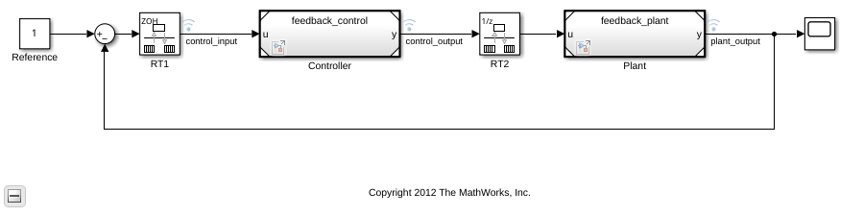
Simulate the top-level harness feedback_harness.slx model.
To open the harness model for simulation, select the Project Shortcuts tab and select the Feedback Harness shortcut. This shortcut opens the feedback_harness.slx model in the harnesses folder of the project.
To simulate the model, click Run.
Observe Simulation Output
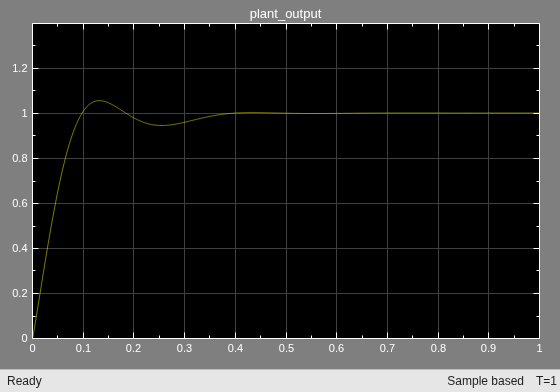
Open the Scope block in the model and observe the simulation output.
To open the scope and observe simulation, in the Simulink window, double-click the Scope block.
Use the Dependency Analyzer View
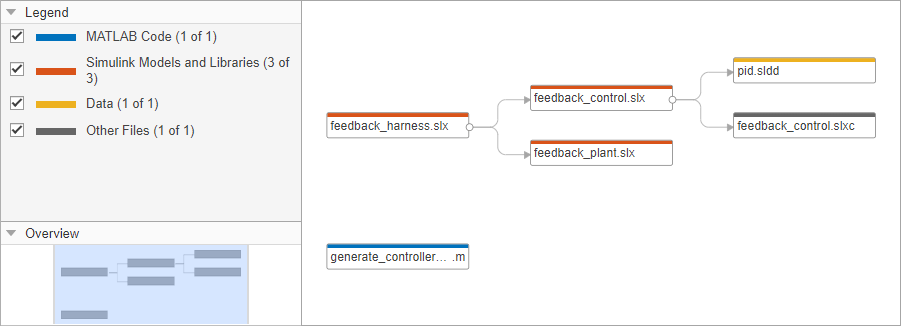
To view file dependencies, use the Dependency Analyzer view of the project.
From the Dependency Analyzer view, you can:
Observe file dependencies.
Hover over the dependency arrows to examine the dependency type.
Double-click on a file or a model to open it.