Train Network Using Automatic Multi-GPU Support
R2026bThis example shows how to use multiple GPUs on your local machine for deep learning training using automatic parallel support.
Training deep learning networks often takes hours or days. With parallel computing, you can speed up training using multiple GPUs. To learn more about options for parallel training, see Scale Up Deep Learning in Parallel, on GPUs, and in the Cloud.
Download Data Set
The Flowers data set contains 3670, 224-by-224 images of flowers belonging to five classes (daisy, dandelion, roses, sunflowers, and tulips). Download and extract the data set.
url = "http://download.tensorflow.org/example_images/flower_photos.tgz";
downloadFolder = tempdir;
filename = fullfile(downloadFolder,"flower_dataset.tgz");

dataFolder = fullfile(downloadFolder,"flower_photos");

if ~exist(dataFolder,"dir")
    fprintf("Downloading Flowers data set (218 MB)... ")
    websave(filename,url);
    untar(filename,downloadFolder)
    fprintf("Done.\n")
end
Downloading Flowers data set (218 MB)...
Done.
Load and Split Data Set
Load the data set by using an imageDatastore object and resize all of the images to have a consistent size. Resizing the images in advance (instead of resizing the images each time the training loads an image) reduces unnecessary processing.
imds = imageDatastore(dataFolder, ...
    IncludeSubfolders=true, ...
    LabelSource="foldernames");

imageSize = [224 224];

resizedImages = dir(fullfile(dataFolder,"flower_photos","**","*.png"));
if isempty(resizedImages)
    tds = transform(imds,@(x) imresize(x,imageSize));

    writeall(tds,dataFolder, ...
        OutputFormat="png", ...
        FolderLayout="duplicate");
end

imdsUniform = imageDatastore(dataFolder, ...
    IncludeSubfolders=true, ...
    LabelSource="foldernames");
Split the data into training (90%) and test (10%) sets.
[imdsTrain,imdsTest] = splitEachLabel(imdsUniform,0.9,"randomized");

classNames = categories(imdsTrain.Labels);
numClasses = numel(classNames);
To train the network with augmented image data, create an augmentedImageDatastore object. Use random translations and horizontal reflections. Data augmentation helps prevent the network from overfitting and memorizing the exact details of the training images.
pixelRange = [-30 30];
imageAugmenter = imageDataAugmenter( ...
    RandXReflection=true, ...
    RandXTranslation=pixelRange, ...
    RandYTranslation=pixelRange);
augmentedImdsTrain = augmentedImageDatastore(imageSize,imdsTrain, ...
    DataAugmentation=imageAugmenter);
Define Network Architecture and Training Options
Define a ResNet-50 network and adjust the number of output classes to match the data set.
net = imagePretrainedNetwork("resnet50",NumClasses=numClasses,Weights="none");
Specify the training options.
Train the network using multiple GPUs by setting the execution environment to
"multi-gpu". When you use multiple GPUs, you increase the available computational resources. Scale up the mini-batch size with the number of GPUs to keep the workload on each GPU constant. Scale the learning rate according to the mini-batch size. Training on a GPU requires a Parallel Computing Toolbox™ license and a supported GPU device. For information on supported devices, see GPU Computing Requirements (Parallel Computing Toolbox).Use a learning rate schedule to drop the learning rate as the training progresses.
Turn on the training progress plot to obtain visual feedback during training.
numGPUs = gpuDeviceCount("available")numGPUs = 4
miniBatchSize = 128*numGPUs;
initialLearnRate = 1e-2*miniBatchSize/64;

options = trainingOptions("adam", ...
    ExecutionEnvironment="multi-gpu", ...
    InitialLearnRate=initialLearnRate, ...
    MiniBatchSize=miniBatchSize, ...
    Verbose=false, ...
    Plots="training-progress", ...
    Metrics="accuracy", ...
    MaxEpochs=80, ...
    Shuffle="every-epoch", ...
    ValidationData=augmentedImageDatastore(imageSize,imdsTest), ...
    ValidationFrequency=floor(4*numel(imdsTrain.Files)/miniBatchSize), ...
    LearnRateSchedule="piecewise", ...
    LearnRateDropFactor=0.1, ...
    LearnRateDropPeriod=50);
Train Network
Train the neural network using the trainnet function. For classification, use cross-entropy loss.
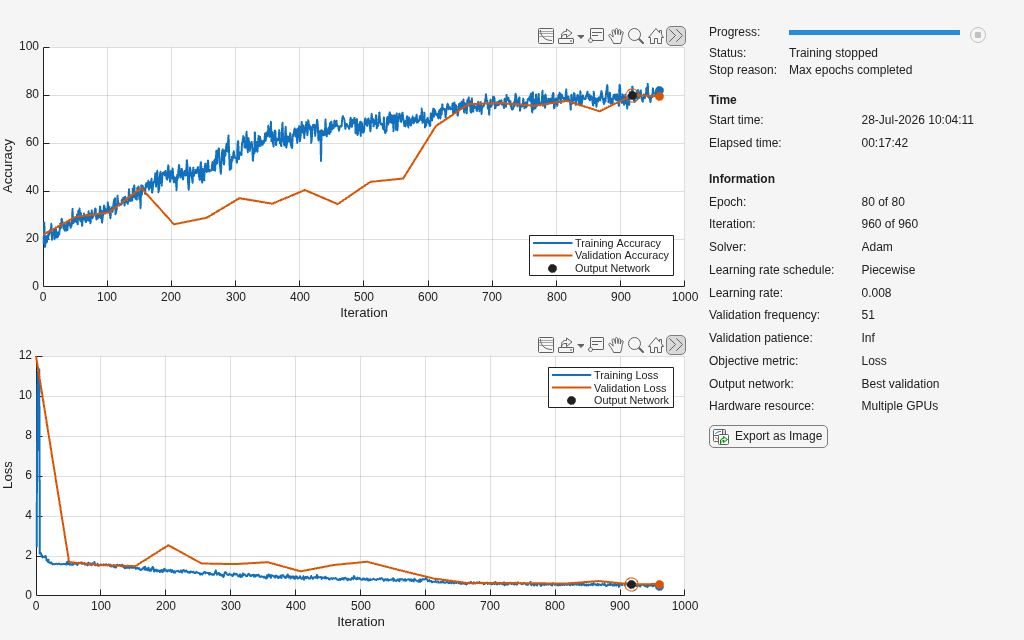
net = trainnet(augmentedImdsTrain,net,"crossentropy",options);Starting parallel pool (parpool) using the 'Processes' profile ... Connected to parallel pool with 4 workers.
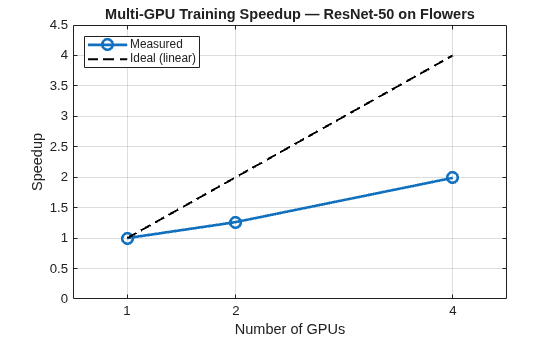
Automatic multi-GPU support can speed up network training by taking advantage of several GPUs. The following plot shows the speedup in the overall training time with the number of GPUs on a Linux machine with four NVIDIA® A5000 GPUs. The speedup you observe will depend on your hardware and code. More computationally intensive training, for example involving large images, usually benefits more from using multiple GPUs.
To verify that training is using all available GPUs effectively, you can use the GPU Monitor (Parallel Computing Toolbox). The GPU Monitor shows GPU utilization, memory usage, and processes in real time for each GPU in your machine.
Test Network
Classify the test images. To make predictions using multiple GPUs, divide up the data, and make the predictions in parallel.
Determine the total number of observations in the test data set.
numObservations = numel(imdsTest.Files);
In this example, you can use the parallel pool that opened during training. If you do not have a parallel pool open, open one with as many workers as you have GPUs.
parpool("Processes",numGPUs);
Use parfor (Parallel Computing Toolbox) to classify the images in parallel. A parfor-loop is similar to a for-loop, but the loop iterations are executed in parallel on workers in a parallel pool. Inside the parfor-loop:
Select a subset of the test data using the
subsetfunction.Make predictions using the
minibatchpredictfunction on the subset. Theminibatchpredictfunction automatically uses a GPU if one is available. Otherwise, the function uses the CPU.Convert the prediction scores to labels using the
scores2labelfunction.
parfor idx = 1:numGPUs
	startIdx = ceil((idx-1)*numObservations/numGPUs) + 1;
    endIdx = ceil(idx*numObservations/numGPUs);
    subdsTest = subset(imdsTest,startIdx:endIdx);
    augSubdsTest = augmentedImageDatastore(imageSize,subdsTest);

    scoresTest = minibatchpredict(net,augSubdsTest,MiniBatchSize=miniBatchSize);
    YTest{idx} = scores2label(scoresTest,classNames);
end
Collect the predictions into a single array.
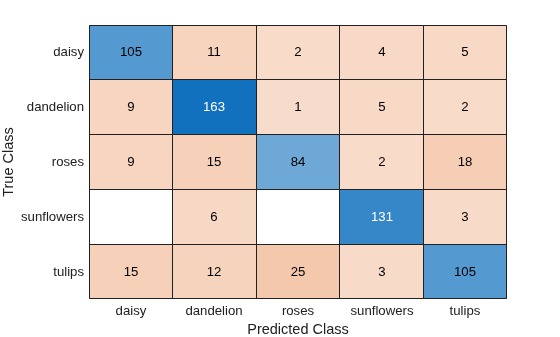
YTest = cat(1,YTest{:});Determine the accuracy of the network and plot a confusion chart.
accuracy = sum(YTest==imdsTest.Labels)/numel(imdsTest.Labels)
accuracy =
0.8000
confusionchart(imdsTest.Labels,YTest)
See Also
trainnet | trainingOptions | dlnetwork | imageDatastore

