Troubleshoot Replicated Functions in Generated Code
R2026bIssue
Under certain circumstances, the code generator defines the same MATLAB® function multiple times in the generated code. This is called function specialization, and it occurs when the code generator detects that calls to this function differ with respect to:
The number of input or output variables.
The types of the input or output variables.
The sizes of the input or output variables.
The values of constant input variables.
To identify function specializations in the generated code, use one of these approaches:
If you generate code by using MATLAB Coder™, inspect the code generation report. See Code Generation Reports.
If you simulate a MATLAB Function block in Simulink®, inspect the MATLAB function report. See MATLAB Function Reports (Simulink).
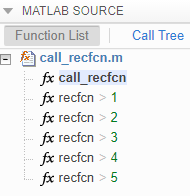
The report shows a list of the duplicate functions underneath the entry-point
function. For example, this image shows that the generated code contains 5
specializations of the function recfcn.
Possible Solutions
In some cases, function specializations are necessary because C and C++ functions do not have the same flexibility as MATLAB functions. In other cases, function specializations are not required, but the code generator specializes functions to optimize the generated code or because of a lack of information. Because excessive function specializations can make the generated code harder to analyze and manage, you can alter your MATLAB code to avoid certain function specializations.
Ignore Constant Input Sizes
If the MATLAB code calls a function multiple times and passes inputs of different
constant sizes, the code generator can create specializations of the function for
each size. For example, consider this function, which calls the user-written
function indexOf twice and passes a different constant input each
time.
function [out1,out2] = size_specializations(in) %#codegen
a = 1:10;
b = 2:40;
out1 = indexOf(a,in);
out2 = indexOf(b,in);
end
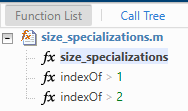
When you generate code for size_specializations, the code
generation report shows two specializations of the indexOf
function.
To prevent these specializations, instruct the code generator to ignore the
constant sizes in the call to indexOf by using coder.ignoreSize. For example:
function [out1,out2] = size_specializations(in) %#codegen
a = 1:10;
b = 2:40;
out1 = indexOf(coder.ignoreSize(a),in);
out2 = indexOf(coder.ignoreSize(b),in);
end
Ignore Constant Input Values
If the MATLAB code calls a function multiple times and passes inputs that have
different constant values, the code generator can create specializations of the
function for each value. For example, consider this function, which calls the
user-written function indexOf twice and passes a different
constant input each time.
function [out1,out2] = value_specializations
c = ['a','b','c'];
out1 = indexOf(c,'a');
out2 = indexOf(c,'b');
end
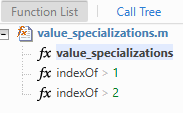
When you generate code for value_specializations, the code
generation report shows two specializations of the indexOf
function.
To prevent these specializations, instruct the code generator to ignore the
constant sizes in the call to indexOf by using coder.ignoreConst. For example:
function [out1,out2] = value_specializations
c = ['a','b','c'];
out1 = indexOf(c,coder.ignoreConst('a'));
out2 = indexOf(c,coder.ignoreConst('b'));
end
Ignore Varying Number of Outputs
If the MATLAB code calls a function with a different number of outputs at different
call sites, the code generator can produce specializations for each call. For
example, consider this function, which calls the user-written function
SqCube twice and specifies a different number of outputs each
time.
function [out1,out2,out3] = output_specialization(in)
[out1,out2] = SqCube(in);
out3 = SqCube(in);
end
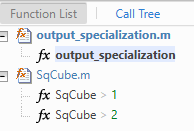
When you generate code for output_specializations, the code
generation report shows two specializations of the SqCube
function.
To prevent these specializations, use the ~ symbol to
explicitly ignore the second output in the second call to SqCube.
Because each call returns the same number of outputs, the code generator does not
generate a specialization for each call.
function [out1,out2,out3] = output_specialization(in)
[out1,out2] = SqCube(in);
[out3,~] = SqCube(in);
end
See Also
coder.ignoreConst | coder.ignoreSize | coder.varsize

