Hauptinhalt

Evaluate Polyspace Bug Finder Results Against Bug Finder Quality Objectives

R2026b

Instead of evaluating all results of a Bug Finder analysis, you can first define a set of criteria that the analyzed project must meet and compare the Bug Finder results against those criteria. The Bug Finder Quality Objectives or BF-QOs are a set of thresholds against which you can compare your Bug Finder analysis results. You can develop a review process based on the Bug Finder Quality Objectives. In your review process, you consider only those results that cause your project to fail a certain BF-QO level.

The Bug Finder Quality Objectives are adapted from Software Quality Objectives in Code Prover. See Evaluate Polyspace Code Prover Results Against Software Quality Objectives (Polyspace Code Prover).

You can use a predefined BF-QO level or define your own. To customize BF-QO levels, see Customize Software Quality Objectives (Polyspace Access).

Following are the predefined quality thresholds specified by each BF-QO.

MetricThreshold Value
Comment density of a file20
Number of paths through a function80
Number of goto statements0
Cyclomatic complexity10
Number of calling functions5
Number of calls7
Number of parameters per function5
Number of instructions per function50
Number of call levels in a function4
Number of return statements in a function1

Language scope, an indicator of the cost of maintaining or changing functions. Calculated as follows:

(N1+N2) / (n1+n2)

  • n1 — Number of different operators

  • N1 — Total number of operators

  • n2 — Number of different operands

  • N2 — Total number of operands

4
Number of recursions0
Number of direct recursions0

Number of unjustified violations of the following MISRA C™:2012 and MISRA C:2023 rules:

  • 5.3

  • 8.8, 8.11, and 8.13

  • 11.1, 11.2, 11.4, 11.5, 11.6, and 11.7

  • 14.1 and 14.2

  • 15.1, 15.2, 15.3, and 15.5

  • 17.1 and 17.2

  • 18.3, 18.4, 18.5, and 18.6

  • 19.2

  • 21.3

0

Number of unjustified violations of the following MISRA™ C++ rules:

  • 2-10-2

  • 3-1-3, 3-3-2, 3-9-3

  • 5-0-15, 5-0-18, 5-0-19, 5-2-8, 5-2-9

  • 6-2-2, 6-5-1, 6-5-2, 6-5-3, 6-5-4, 6-6-1, 6-6-2, 6-6-4, 6-6-5

  • 7-5-1, 7-5-2, 7-5-4

  • 8-4-1

  • 9-5-1

  • 10-1-2, 10-1-3, 10-3-1, 10-3-2, 10-3-3

  • 15-0-3, 15-1-3, 15-3-3, 15-3-5, 15-3-6, 15-3-7, 15-4-1, 15-5-1, 15-5-2

  • 18-4-1

0

In addition to all the requirements of BF-QO Level 1, these levels includes the following thresholds:

MetricThreshold Value
Number of high-impact defects. See also Classification of Defects by Impact.0

In addition to all the requirements of BF-QO Level 2 and 3, this level includes the following thresholds:

MetricThreshold Value
Number of medium-impact defects. See also Classification of Defects by Impact.0

In addition to all the requirements of BF-QO Level 4, this level includes the following thresholds:

MetricThreshold Value

Number of unjustified violations of the following MISRA C:2012 and MISRA C:2023 rules:

  • D4.6 and D4.11

  • 8.2, 8.9, and 8.12

  • 9.2 and 9.3

  • 10.1 and 10.8

  • 11.8

  • 12.1 and 12.3

  • 13.2 and 13.4

  • 14.4

  • 15.6 and 15.7

  • 16.4 and 16.5

  • 17.4

  • 20.4, 20.6, 20.7, 20.9, and 20.11

0

Number of unjustified violations of the following MISRA C++ rules:

  • 3-4-1, 3-9-2

  • 4-5-1

  • 5-0-1, 5-0-2, 5-0-7, 5-0-8, 5-0-9, 5-0-10, 5-0-13, 5-2-1, 5-2-2, 5-2-5, 5-2-6, 5-2-7, 5-2-11, 5-3-2, 5-3-3, 5-18-1

  • 6-2-1, 6-3-1, 6-4-2, 6-4-6

  • 8-4-3, 8-4-4, 8-5-2, 8-5-3

  • 11-0-1

  • 12-1-1, 12-8-2

  • 16-0-5, 16-0-6, 16-0-7, 16-2-2, 16-3-1

0

In addition to all the requirements of BF-QO Level 5, this level includes the following thresholds:

MetricThreshold Value
Number of low-impact defects. See also Classification of Defects by Impact.0

In addition to all the requirements of BF-QO Level 6, this level includes the following thresholds. The thresholds for coding rule violations apply only if you check for coding rule violations.

MetricThreshold Value
Number of unjustified MISRA C and MISRA C++ coding rule violations0
Number of unjustified defects0

Comparing Analysis Results Against Quality Objectives

You can compare your analysis results against SQOs in the Polyspace® Access™ web interface. For information about how to do this in the deprecated Polyspace desktop user interface, see Comparing Analysis Results Against Quality Objectives (R2025b).

In the Polyspace Access web interface, you can first determine whether your project fails to attain a certain Quality Objective threshold by looking at the Quality Objectives card on the Project Overview dashboard.
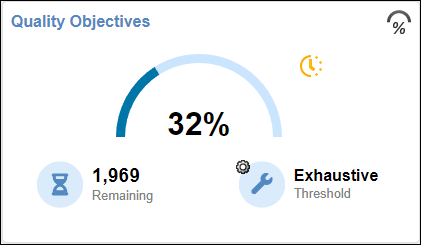
Quality objectives card showing 32% completion for SQO2 threshold with 1,969 remaining unaddressed findings.

The card shows the percentage of results that you have already fixed or justified in order to attain the threshold. Click the number of remaining findings to open those findings in the Results List. For a more detailed view of the quality of your code against all quality objectives thresholds, open the Quality Objectives dashboard. For more information, see Monitor Code Quality Using Quality Objectives Dashboard in Polyspace Access (Polyspace Access).

See Also

Topics